

Windows 10 Overview: The Old's The New New

Microsoft has officially announced the next Windows operating system and if you were expecting it to be called Windows 9, please be informed that the next Windows will be called Windows 10. That's right. Microsoft wants to tell us that they are going a step beyond what's expected and is trying to make things easier for everyone who's used to Windows OS - from the end users to the developers. Here's an overview of what's new in Windows 10, expected to release sometime in late 2015.
Runs Everywhere
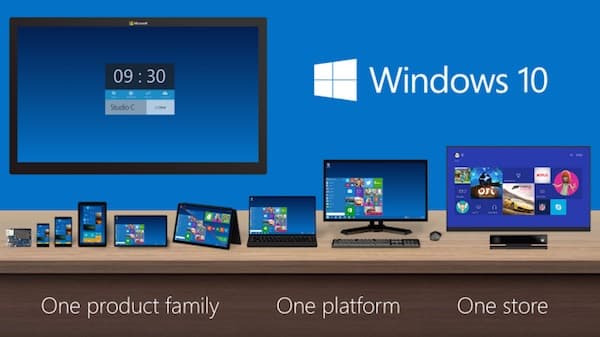
Microsoft says that Win10 is their most comprehensive platform ever. That is, it will be capable of supporting a very wide range of devices - from your phones, tablets, laptops, desktops, Internet Of Things to servers in data centers and maybe wearable devices too. Windows 10 supports devices with display sizes ranging from 4" to 80" and even the devices without screens!
It Looks Like Windows 7
...and that's what Microsoft intended! Microsoft informed the media that a large number of users are still using Windows 7 and they wanted to make the upgrade experience as smooth as possible for everyone. Joe Belfiore said that if Windows 7 was like driving the first generation of Toyota Prius, then Windows 10 is like driving a Tesla. We'll have to wait for the first public beta release of the OS to get that experience.
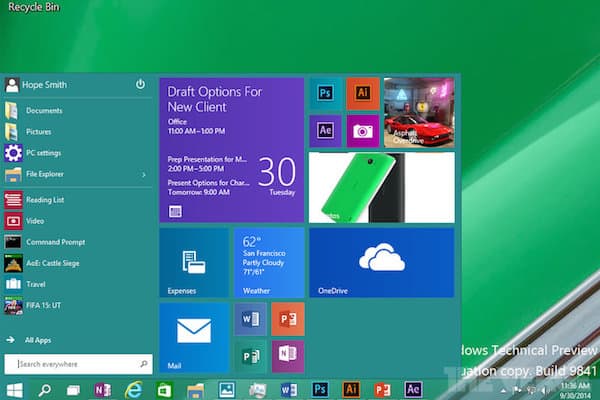
The Start Button Is Back With Lot Of Live Tiles In The Menu
The start button would definitely be among the top 5 virtual buttons pressed ever in the world of computers and for some reason Microsoft had decided to ditch it in Windows 8. If you missed your start button, the good news is that it's making a comeback in Windows 10 - and the menu it opens, has lots of live tiles. Microsoft says that it's bringing the best of both worlds from Win7 and Win8. It also means that you will no longer be greeted by a huge set of live tiles when you start your computer. These tiles can be moved and resized, as per your preference.
Microsoft's also including Universal search; a la OSX spotlight search. And those who love going back to the command prompt - you'll love to know that it now supports paste.
There's an 'Insider' program coming up for all the vocal Windows aficionados who'll get access to beta builds before everyone else. Microsoft expects you to voice your opinions right to the engineering team. The feature set is still being finalised and Microsoft promised to talk about them early next year.
Source: #-Link-Snipped-#
![[Prototype]](/avatar/initials/5b50/0.svg?v=2)



