Unable To Access Gmail Account From Gmail Application.

Abhishek Rawal

Abhishek Rawal

@abhishek-fg9tRh Oct 22, 2024
Until 5 days ago, everything was cool. I was able to access my gmail account from Android gmail application.
Recently, I thought I need to make my account more secure.So,
- I changed my password
- Added Phone number security
- Linked Google authenticator

Now, I am unable to access gmail account from gmail application of android, mainly because i have added 3 to 4 layers of security & most probably the "authenticator".
Is it any possible other way of accessing gmail account from gmail app ?
I can access gmail account from browser, but browsers doesn't allows me to sync the mails which makes my work even more time consuming.

Any successful help will be highly appreciated. Thank you.

Replies

Welcome, guest

Join CrazyEngineers to reply, ask questions, and participate in conversations.

CrazyEngineers powered by Jatra Community Platform

  • Sanyam Khurana

    Sanyam Khurana

    @sanyam-Nl7Zqc May 12, 2013

    I think there's a link given to you when you log in from your mobile (android app) which says 'Approve from other device' , and then you can approve it from your desktop....
  • Abhishek Rawal

    Abhishek Rawal

    @abhishek-fg9tRh May 12, 2013

    Can't find any such option. 😔
  • Sanyam Khurana

    Sanyam Khurana

    @sanyam-Nl7Zqc May 12, 2013

    Abhishek Rawal
    Can't find any such option. 😔
    Ok, is it showing you the log in screen on the app?

    Just enter your ID and pass , then what does it show..?
  • Abhishek Rawal

    Abhishek Rawal

    @abhishek-fg9tRh May 12, 2013

    Sanyam Khurana
    Ok, is it showing you the log in screen on the app?

    Just enter your ID and pass , then what does it show..?
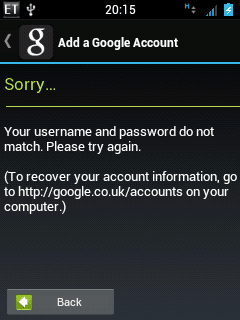
    After entering email address & password, all i get is this :

    1
  • Anoop Kumar

    Anoop Kumar

    @anoop-kumar-GDGRCn May 12, 2013

    #-Link-Snipped-#:
    Go to manage-applications --> Gmail and clear all data. and login again.

    PS: <a href="https://play.google.com/store/apps/details?id=com.google.android.apps.authenticator2&hl=en" target="_blank" rel="nofollow noopener noreferrer">Google Authenticator - Apps on Google Play</a>is awesome 👍👍
  • Sanyam Khurana

    Sanyam Khurana

    @sanyam-Nl7Zqc May 12, 2013

    Abhishek Rawal
    After entering email address & password, all i get is this :

    1
    I wonder how could this happen, as according to me, you would have been logged in, but it would ask you for extra security layers, or will give you an option to review your login from desktop browser... 😲
  • Abhishek Rawal

    Abhishek Rawal

    @abhishek-fg9tRh May 12, 2013

    #-Link-Snipped-# Same result. Should I wipe cache from recovery mode ?

    #-Link-Snipped-# I don't know,man. This shit pisses me off ! 😡
  • Sanyam Khurana

    Sanyam Khurana

    @sanyam-Nl7Zqc May 12, 2013

    Hmm... wipe out the cache, and if it doesn't work, try deleting and re -installing GMail app...

    I hope it works fine then..

    All the best..!! 👍
  • Abhishek Rawal

    Abhishek Rawal

    @abhishek-fg9tRh May 12, 2013

    Thank you both #-Link-Snipped-# & #-Link-Snipped-# for sparing time & trying to help me solve this problem.

    I will delete & reinstall the app.
    Let's see what comes the output. God! I hate this. Sheer waste of time !
  • Anoop Kumar

    Anoop Kumar

    @anoop-kumar-GDGRCn May 12, 2013

    Abhishek Rawal
    #-Link-Snipped-# Same result. Should I wipe cache from recovery mode ?
    Can you try to access from mobile default browser (Google's one).
    If no luck then try clearing devliK cache.
  • Anoop Kumar

    Anoop Kumar

    @anoop-kumar-GDGRCn May 12, 2013

    #-Link-Snipped-# :
    Are you running 2.3 Gingerbread??
    Then, according to google you should get this error and might be your solution:

    #-Link-Snipped-#
  • Abhishek Rawal

    Abhishek Rawal

    @abhishek-fg9tRh May 12, 2013

    #-Link-Snipped-# It's Custom ROM.
    Anyways,Dalvik-cache removed. Gmail removed using Root-browser. Reinstalled Gmail & made it system application using Link2sd.
    Ta da! It works now,Thank you all 😀
  • Sanyam Khurana

    Sanyam Khurana

    @sanyam-Nl7Zqc May 12, 2013

    Abhishek Rawal
    #-Link-Snipped-# It's Custom ROM.
    Anyways,Dalvik-cache removed. Gmail removed using Root-browser. Reinstalled Gmail & made it system application using Link2sd.
    Ta da! It works now,Thank you all 😀
    Congrats 😁
  • Anoop Kumar

    Anoop Kumar

    @anoop-kumar-GDGRCn May 12, 2013

    Good to know problem solved...