Office Lens On iOS And Android So You Don't Lose Receipts Or Those Sticky Notes

Ever since Microsoft launched the <a href="https://www.crazyengineers.com/threads/microsoft-onenote-for-mac-jam-packed-with-new-features.73958">Microsoft OneNote for Mac Jam-Packed With New Features</a> as a part of the revamped One Note application, users have been flooding the app store to download it for free. With a 4+ rating and thousands of happy reviews, an year later, Microsoft has decided to come up with the same app for Android and iOS smartphone users. The aim of the Office Lens app is simple. It allows users to capture an image of any document or whiteboard, crops it to the perfect size and enhances the picture quality so that you can come back to it later. Microsoft describes it as, "It's like having a scanner right in your pocket." But it does more. The Office Lens app is capable of digitizing the text from the image you captured so that it becomes editable via MS word, PDF or even PowerPoint files.
Microsoft presents a number of scenarios where the Office Lens app could make the user's life a lot easier. For instance, the information presented on a whiteboard in a meeting room can be captured as a image in Office Lens app. This way sharing MoM (minutes of meeting) or notes become easy peasy. Users of the app can easily create digital copies of their hard copies, posters, important receipts etc. The Office Lens app will use the optical character recognition (OCR) technology to automatically convert the text in that image into editable words. Here is a demo -
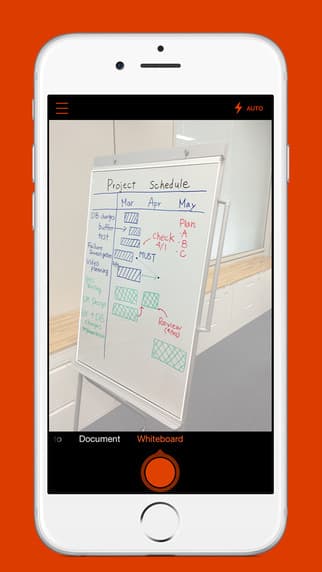
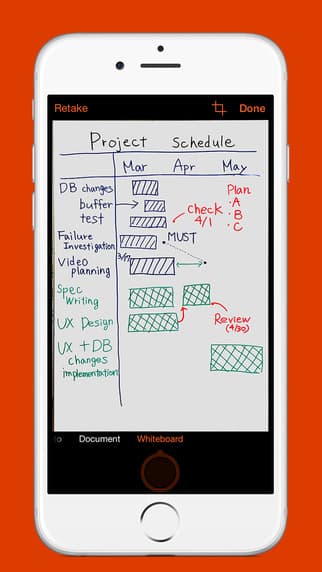
To enhance the quality of the image captured, the Office Lens app cleans up the glare and removes shadows. The app offers options to store the image in either OneNote or OneDrive as .docx, .pptx, .pdf, or .jpg format and from there users can choose to save, export or share it.
Though the app has already been put up on the iTunes store for the iOS running devices, those using an Android phone, will have to join the Google+ community named #-Link-Snipped-#, choose to Become a Tester and then follow instructions on the page. Those who would like to starting use the app can download it for #-Link-Snipped-#, #-Link-Snipped-# or #-Link-Snipped-#.
Check out a demonstration here:
What are your thoughts on the Office Lens app? Share with us in comments below.
Source: #-Link-Snipped-#