IES 2017 - Exam Date | Application Form | Registration | How to Apply

What is IES ESE or Indian Engineering Services Exam?
Union Public Services Commission (UPSC) conducts the Engineering Services Exam or ESE 2017 is an entrance exam for graduates who wish to work under the Government of India in the sectors of Power, Telecommunications, Railroads, Public works etc.
The examination consists of a written examination followed by an interview for personality test.
The recruited candidates at IES 2016 will be eligible for following categories -
1. Civil Engineering
2. Electrical Engineering
3. Mechanical Engineering
4. Electronics and Telecommunication Engineering
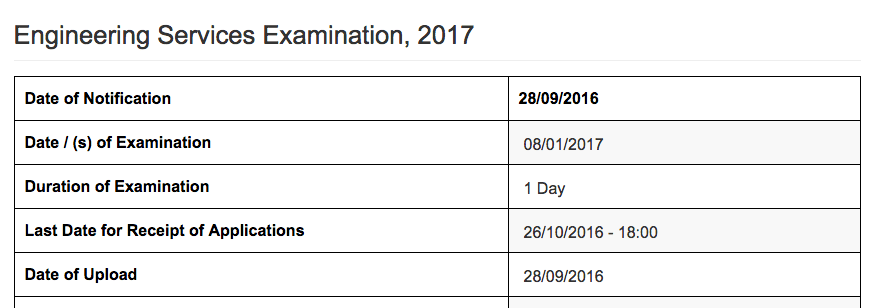
What is IES ESE 2017 examination date and schedule?
<Yet to be revealed>
What is the admission criteria of qualification needed for taking the exam?
- B.Tech/B.E or,passed Sections A and B of the Institution Examinations of the Institution of Engineers (India). or,
- Obtained a degree/diploma in Engineering from such foreign University/College/Institution and under such conditions as may be recognized by the Government for the purpose from time to time, or
- Passed Graduate Membership Examination of the Institute of Electronics and Telecommunication Engineers (India); or
- Passed Associate Membership Examination Parts II and III/Sections A and B of the Aeronautical Society of India; or
- Passed Graduate Membership Examination of the Institution of Electronics and Radio Engineers, London held after November, 1959
Source: upsc.gov.in
Age-limit: 21-30 years on 1st August of the year of Examination.
What is IES 2017 Exam Application Fee?
Rs. 200 for - General/OBC candidates is Rs. 200
No Application fee for - SC, ST, PH and female candidates
Candidates can make payment through online mode or offline mode.
Online Payment Mode: Credit Card, Debit Card and Internet Banking.
Offline Payment Mode: E-Challan through any branch of SBI (State Bank of India)
How to apply online for UPSC IES 2017 Application Form?
- Candidates need to scan their photograph and signature.
- Now candidates should lo gin to UPSC website #-Link-Snipped-#
- Fill up application form with all necessary details.
- Check the all details carefully and press submit button.
- Online application System will now generate the registration number.
- Get the printout of the online challan and pay the fee to your nearest SBI bank.
- Now visit the web portal again to finish the process.
- Fill the challan number and registration number and press enter.
- Take the print out of the system generated reference number/form for the future use.
- That's it.
In case of any questions/queries, please reply below.