

How To Create GPG Key In Ubuntu ?

@abhishek-fg9tRh
•
Oct 24, 2024
Oct 24, 2024
1.2K
Everyone of you might be knowing what's GPG Key, if not then read <a href="https://help.ubuntu.com/community/GnuPrivacyGuardHowto" target="_blank" rel="nofollow noopener noreferrer">GnuPrivacyGuardHowto - Community Help Wiki</a>.
There are plenty ways to create GPG keys, some developers even developed application to automatically generate GPG keys. However, I like Bash, so we'll use terminal to create GPG keys :
Steps :
Open Terminal & type :
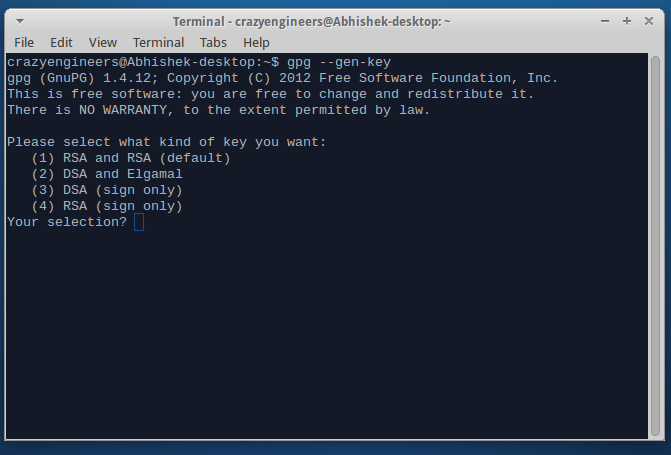
Now press "1" then press enter.It will select default encryption technique i.e RSA & RSA.
Now it will ask for the bitsize of the RSA key :

Type "2048" & press Enter.
Once you'll press enter, following will be the output :
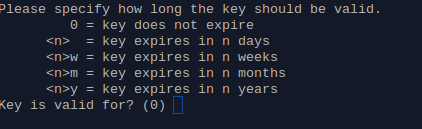
Press "0" & click on "Enter". It will ask for confirmation, Press "y" & then again "Enter"
Now it will ask for, Email address, Name & comment : Don't forget the entered data. Remember it or jot it down somewhere.
After filling up the details & pressing enter it will look something like this :
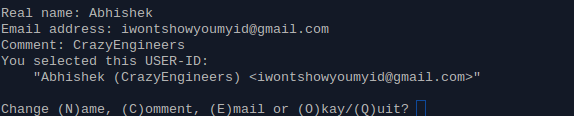
PS: I have used fake ids for security concern, you dont do that!
Press "O" for "Okay & then hit on enter.
Now it will ask for passphrase, just type the desired password & don't forget it. Press Enter and something this will pop :
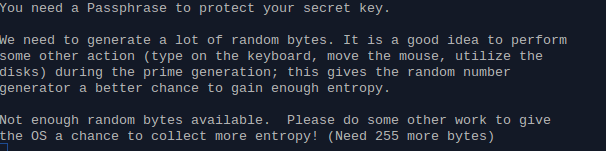
So, you just randomly do some work, like open gedit & randomly type some shit for sometime/ open hard-drive do transfer files & anything like that. In few moment the data will be obtained & the process will stop.
And, the Key will be generated, it will look something like :
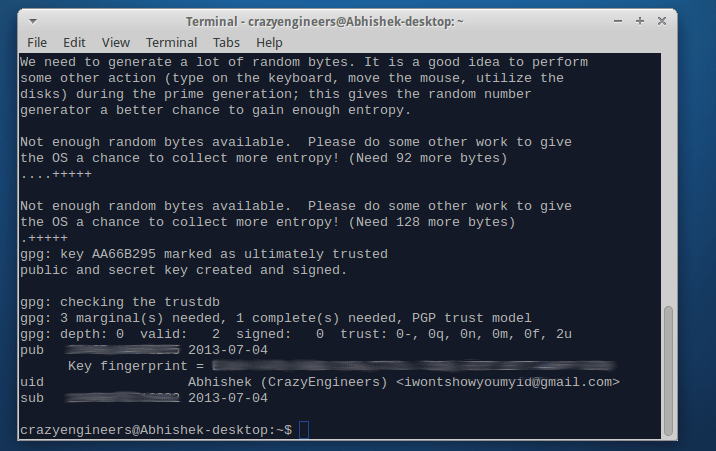
i have erased they key for security purpose.
Job's done!
To view your GPG key, In Terminal type :
There are plenty ways to create GPG keys, some developers even developed application to automatically generate GPG keys. However, I like Bash, so we'll use terminal to create GPG keys :
Steps :
Open Terminal & type :
gpg --gen-keyIt will give you output, something like :
Now press "1" then press enter.It will select default encryption technique i.e RSA & RSA.
Now it will ask for the bitsize of the RSA key :
Type "2048" & press Enter.
Once you'll press enter, following will be the output :
Press "0" & click on "Enter". It will ask for confirmation, Press "y" & then again "Enter"
Now it will ask for, Email address, Name & comment : Don't forget the entered data. Remember it or jot it down somewhere.
After filling up the details & pressing enter it will look something like this :
PS: I have used fake ids for security concern, you dont do that!
Press "O" for "Okay & then hit on enter.
Now it will ask for passphrase, just type the desired password & don't forget it. Press Enter and something this will pop :
So, you just randomly do some work, like open gedit & randomly type some shit for sometime/ open hard-drive do transfer files & anything like that. In few moment the data will be obtained & the process will stop.
And, the Key will be generated, it will look something like :
i have erased they key for security purpose.
Job's done!
To view your GPG key, In Terminal type :
gpg --list-keys👍