

Your Google Blogspot Domain Now Has HTTPS Support Enabled By Default

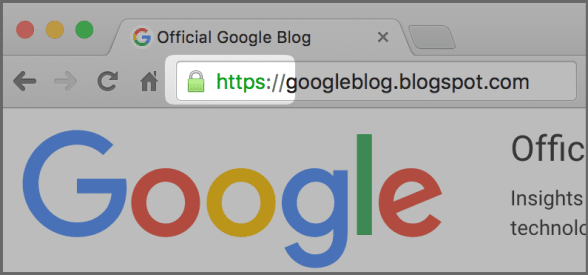
Google Blogspot is one of the most popular blogging platforms in the world. Since they are owned by Google who go by the âHTTPS Everywhereâ mantra, they will now have HTTPS version enabled by default. Yes, each and every Blogspot domain blog whether itâs your travel or food blog will be accessible over an encrypted channel. Google had began the process of making Blogspot domains HTTPS secure back in September 2015 when it began an opt-in program where you could enable and try out its HTTPS support. With this launch, the HTTPS Availability setting has now been removed from your settings and enabled by default. Even if you didnât try this during the rollout phase, no worries, Google has enabled your HTTPS version for you.
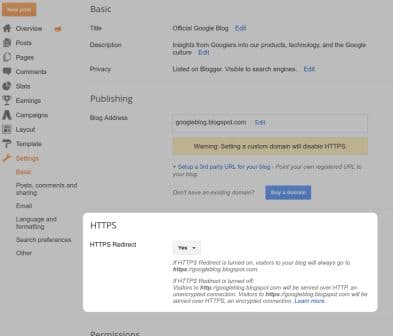
Google has also debuted a new setting called the âHTTPS Redirectâ that shall allow you to redirect HTTP requests to HTTPS. If you choose to turn on this feature then people who have an existing HTTP link to your blog page will be redirected to the HTTPS version. You can even choose to disable it, after which the website visitor will be given the option of either visiting the unencrypted HTTP hyperlink or the encrypted HTTPS hyperlink.
This shift to HTTPS might however cause some errors on your blog if you have used mixed content such as incompatible templates, gadgets, or post content. Google <a href="https://security.googleblog.com/2016/05/bringing-https-to-all-blogspot-domain.html" target="_blank" rel="nofollow noopener noreferrer">Google Online Security Blog: Bringing HTTPS to all blogspot domain blogs</a>it is actively working on fixing these issued but ultimately itâs the blog owner who is responsible. Whenever you are using a mixed content tool such as an unsecure plug-in or third party template Google will warn you with the help of its mixed content warning tool. You can then rectify this issue by replacing or removing the problem causing web element. You have to note here that blogs with custom domains do not yet have HTTPS support.
Source: <a href="https://security.googleblog.com/2016/05/bringing-https-to-all-blogspot-domain.html" target="_blank" rel="nofollow noopener noreferrer">Google Online Security Blog: Bringing HTTPS to all blogspot domain blogs</a>