
You Can Run Linux In A Window On Your Google Chromebook With Crouton Chrome Extension

Satya Swaroop Dash

Satya Swaroop Dash

@satya-swaroop-YDeBJM Oct 24, 2024
The updated version of Crouton Chrome extension on Google Chromebooks now lets you run your favourite Linux version in a window. Since Chromebooks are build on a Linux core it allowed them previously to run Linux based OS with the help of virtual machines but you had to switch back and forth from Chrome OS to Linux. The updated version requires you to switch to Developer Mode and after that you can download and install the add-on from #-Link-Snipped-#. Follow the steps given on Google evangelist, François Beaufort’s #-Link-Snipped-# and you can easily juggle work on two operating systems on your Chromebook.
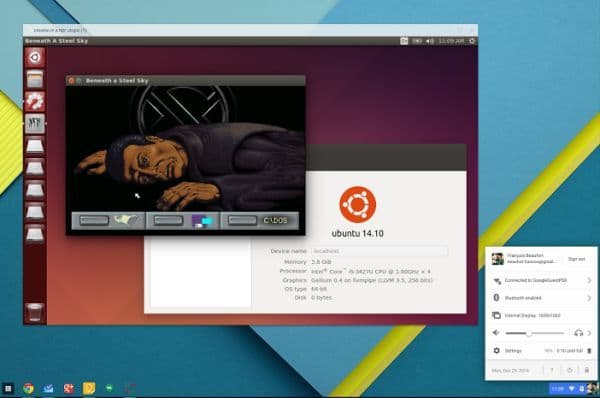

Screenshot 2014-12-29 at 11.09.09 AM

Replies

Welcome, guest

Join CrazyEngineers to reply, ask questions, and participate in conversations.

CrazyEngineers powered by Jatra Community Platform

  • Kaustubh Katdare

    Kaustubh Katdare

    @thebigk Dec 30, 2014

    Waiting for something that lets us do this on OSX.
  • Abhishek Rawal

    Abhishek Rawal

    @abhishek-fg9tRh Dec 31, 2014

    Satya Swaroop Dash
    Since Chromebooks are build on a Linux core it allowed them previously to run Linux based OS with the help of virtual machines but you had to switch back and forth from Chrome OS to Linux.
    Wrong statement.
    Not with the 'Virtual machine'. Infact Crouton never used virtualization. It was/is using Chroot Environment.
    Chroot != Virtualization.
