Windows 7 services stopping automatically in PC . Need help!!

rahul69

rahul69

@rahul69-97fAOs Oct 24, 2024
My computer is having a strange problem. It has Windows 7 64 bit, and everything was working fine till yesterday.
I have two accounts : one Admin account and other Standard User account, today I logged in Standard user account and display driver stopped working , I restarted computer and tried to login to the Standard user account when I got a message like this:
"System event Notification service stopped, cannot log in , contact system Administrator"
I logged in Admin account, enabled the service, logged of admin and tried to log in again,

Now problem is every time I try to log in, one new service stops and hence does not allow me to log in to Standard User account, Moreover, In Admin account also the display driver (and many other services not working).

Has anybody have any idea how to stop this, please help!!
It feels like my OS is dying a Natural Death (pun intended), I hate formatting the OS so would be glad if somebody knows any cure!

ps : <mods plz shift the thread if not in appropriate section>
-Rahul69

Replies

Welcome, guest

Join CrazyEngineers to reply, ask questions, and participate in conversations.

CrazyEngineers powered by Jatra Community Platform

  • Neeraj Sharma

    Neeraj Sharma

    @neeraj-iAaNcG Jul 6, 2013

    Have you tried updating your drivers?
  • Keerthivasan Ravisankar

    Keerthivasan Ravisankar

    @keerthivasan-hrKQir Jul 6, 2013

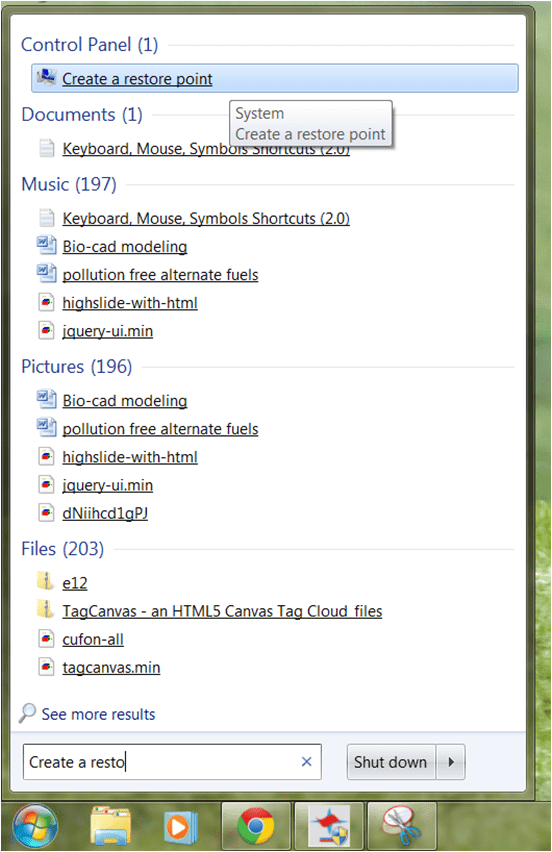
    Just do System restore from your windows search box "Create a restore point"
  • rahul69

    rahul69

    @rahul69-97fAOs Jul 7, 2013

    Thanks for helping 😀!

    Nick_Sharma
    Have you tried updating your drivers?
    Already tried it, but nothing changed...

    rkvasan68
    Just do System restore from your windows search box "Create a restore point"
    I think that I must be having a restore point already to revert to that, in order to do System Restore, but I haven't made any in the past. If I am wrong, please elaborate on how to go about it.
  • Ashraf HZ

    Ashraf HZ

    @Ash Jul 7, 2013

    rahul69
    Thanks for helping 😀!


    Already tried it, but nothing changed...


    I think that I must be having a restore point already to revert to that, in order to do System Restore, but I haven't made any in the past. If I am wrong, please elaborate on how to go about it.
    Bro, try to run the Repair Computer option from boot. Refer to this link:

    <a href="https://www.sevenforums.com/tutorials/666-advanced-boot-options.html?ltr=A" target="_blank" rel="nofollow noopener noreferrer">Just a moment...</a>

    If you have time, it would also be useful to view the Event logs of your system and find the time when this error occurred. You can find out the causes of the error, if its due to applications or drivers, etc.
  • Kaustubh Katdare

    Kaustubh Katdare

    @thebigk Jul 7, 2013

    I searched the error online but it didn't take me anywhere. The best way to fix these system related errors is to run Windows repair tool when the system boots. If you need exact steps let me know.
  • Keerthivasan Ravisankar

    Keerthivasan Ravisankar

    @keerthivasan-hrKQir Jul 7, 2013

    rahul69
    Thanks for helping 😀!
    ......
    If I am wrong, please elaborate on how to go about it.
    The thing is if your computer or laptop running 'Windows 7' the OS itself will have some self restore points which can be accessed by the users. It, the OS will set a restore point when
    1. A Windows update is done either automatically or manually, OR
    2. A software is installed that makes some changes in the OS like installing or uninstalling an antivirus(genuine), Tuneup utilities,.etc these kind of process.

    To do a System restore.
    Follow Pictorial Steps:
    Press Winkey(Windows) → Create a restore point(Type in search box)
    Picture1 → Click the program(Create a restore point)
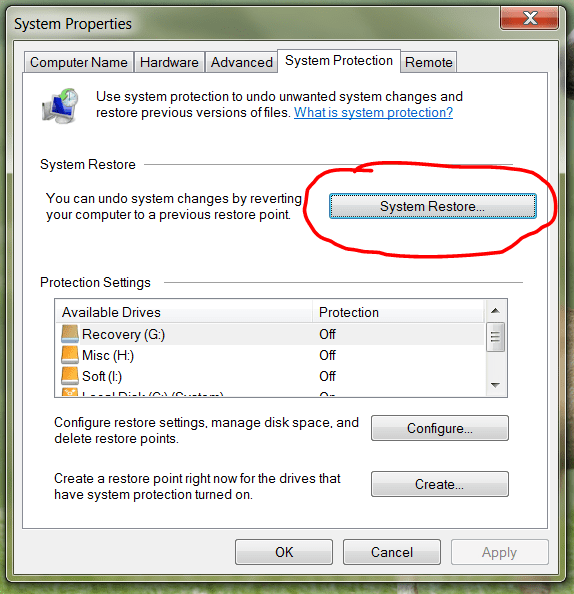
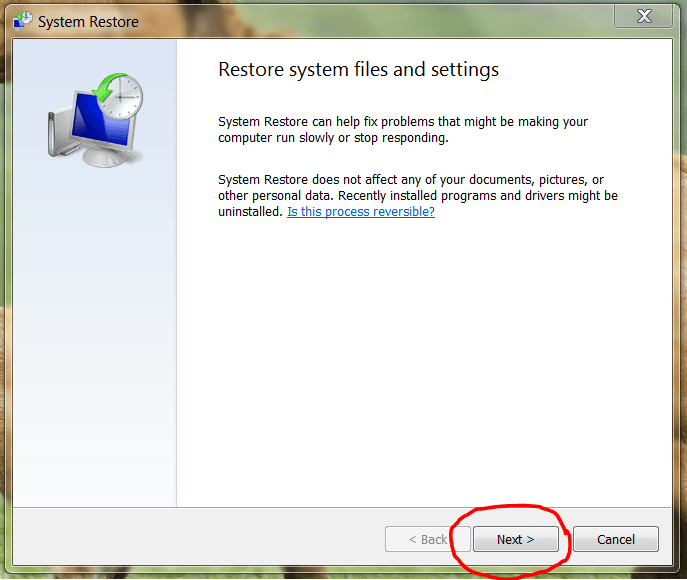
    Picture2 → System protection → System restore

    Picture3 → Next

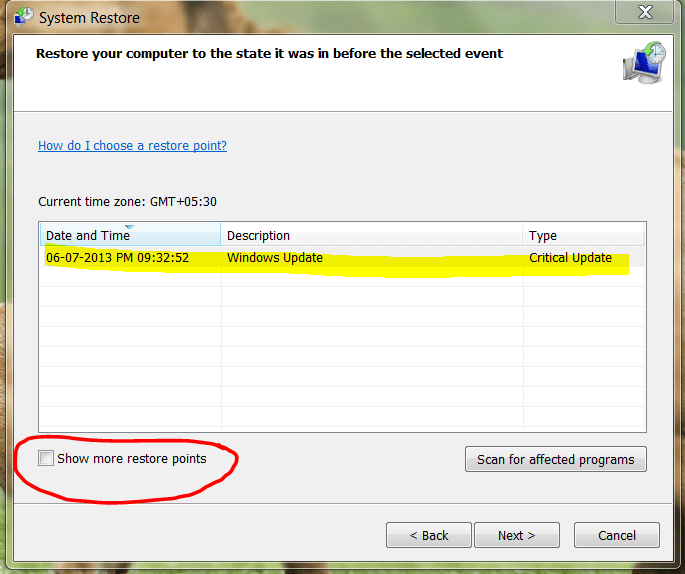
    Picture4 → Click Check box 'Show more restore points'
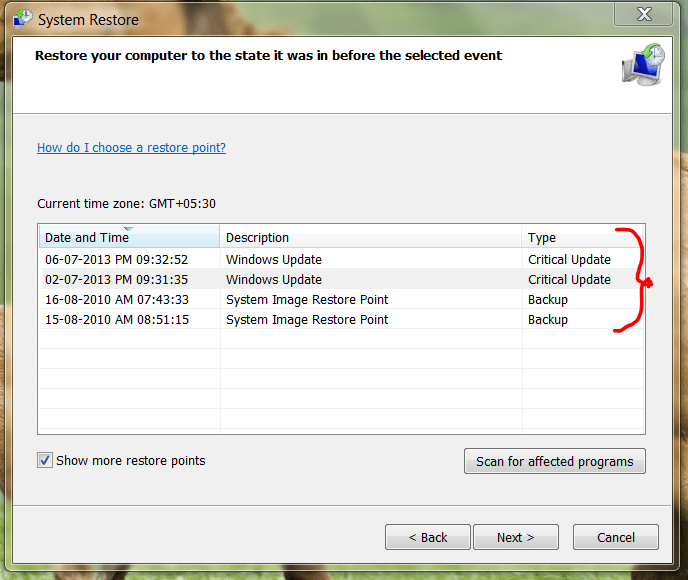
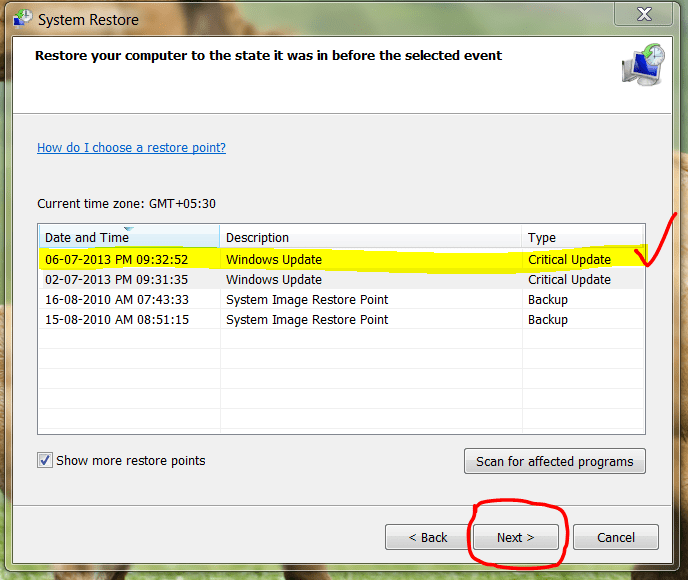
    Picture5 → Pick one restore point
    (The date your computer WAS PERFECTLY WORKING)

    Make your decision confident and firm
    Picture6 → Next

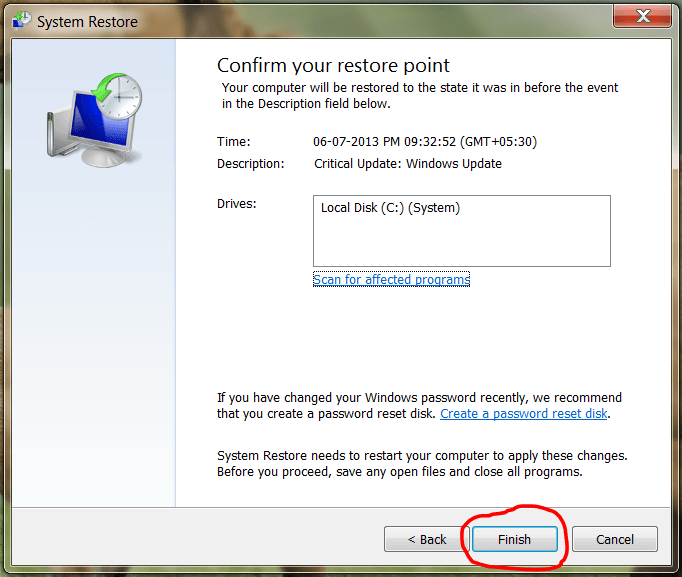
    Picture7 → Click Finish.

    Then the system itself makes the perfect restore session within few minutes. It does not take away any of your files but your programs that was installed after the date of restore point.
  • Keerthivasan Ravisankar

    Keerthivasan Ravisankar

    @keerthivasan-hrKQir Jul 7, 2013

    rkvasan68
    The thing is if your computer or laptop running 'Windows 7' ..........................................................
    ........................................Then the system itself makes the perfect restore session within few minutes. It does not take away any of your files but your programs that was installed after the date of restore point.

    Forgot to mention act according to the steps given by your computer while doing this process.
  • rahul69

    rahul69

    @rahul69-97fAOs Jul 9, 2013

    Well, tried the steps #-Link-Snipped-# told, but the repair failed 😔, could not try the steps told by #-Link-Snipped-# as my desktop was deleted 😲 (seriously, message came as "C:\user\..\Desktop has been shifted to another location"), then I guessed it was the doing of some virus 😡, went for formatting and reinstall 👎.
    But now it is working fine ☕. Thnx everybody for help!!👍
  • Abhishek Rawal

    Abhishek Rawal

    @abhishek-fg9tRh Jul 9, 2013

    Virus! ah! 😁
  • rahul69

    rahul69

    @rahul69-97fAOs Jul 9, 2013

    Abhishek Rawal
    Virus! ah! 😁
    Ye linux user laughing on me 😲 , see on the bright side my PC running faster than before 😛, and don't go on to start a debate here 😉 😁.
  • Abhishek Rawal

    Abhishek Rawal

    @abhishek-fg9tRh Jul 9, 2013

    rahul69
    Ye linux user laughing on me 😲 , see on the bright side my PC running faster than before 😛, and don't go on to start a debate here 😉 😁.
    Ah! Fast Windows 😁 😛
  • Keerthivasan Ravisankar

    Keerthivasan Ravisankar

    @keerthivasan-hrKQir Jul 9, 2013

    rahul69
    Well, tried the steps #-Link-Snipped-# told, but the repair failed 😔, could not try the steps told by #-Link-Snipped-# as my desktop was deleted 😲 (seriously, message came as "C:\user\..\Desktop has been shifted to another location"), then I guessed it was the doing of some virus 😡, went for formatting and reinstall 👎.
    But now it is working fine ☕. Thnx everybody for help!!👍
    Sorry for that..
  • Ashraf HZ

    Ashraf HZ

    @Ash Jul 9, 2013

    rahul69
    Ye linux user laughing on me 😲 , see on the bright side my PC running faster than before 😛, and don't go on to start a debate here 😉 😁.
    Repair failed? What error came out? I wonder logging in to safe mode and performing a scan would have made the difference? Interesting virus.. ☕

    Have you partitioned your hard disk separately at the moment? e.g C & D drives.
  • Keerthivasan Ravisankar

    Keerthivasan Ravisankar

    @keerthivasan-hrKQir Jul 10, 2013

    ash
    Repair failed? What error came out? I wonder logging in to safe mode and performing a scan would have made the difference? Interesting virus.. ☕

    Have you partitioned your hard disk separately at the moment? e.g C & D drives.
    For that just install Kaspersky Internet Security from a gadget store or online purchase and run a vulnerable scan to remove that Program eater😲
  • rahul69

    rahul69

    @rahul69-97fAOs Jul 10, 2013

    ash
    Repair failed? What error came out? I wonder logging in to safe mode and performing a scan would have made the difference? Interesting virus.. ☕

    Have you partitioned your hard disk separately at the moment? e.g C & D drives.
    The error came along the lines of "Windows Repair failed" and then in a moment PC rebooted,and yes I had partitioned the hard disk in C and D, but after the repair failed, I formatted whole system and repartitioned my hard disk and installed fresh OS.
    rkvasan68
    For that just install Kaspersky Internet Security from a gadget store or online purchase and run a vulnerable scan to remove that Program eater😲
    Well now my system is working fine, anyways thanks for info!