Solutions to Ubuntu Related Problems

Sanyam Khurana

Sanyam Khurana

@sanyam-Nl7Zqc Oct 22, 2024
This thread is created for solutions to all problems related to Ubuntu.
I'm tagging the people who would help #-Link-Snipped-# and #-Link-Snipped-#


First problem I'm facing :

I downloaded adobe flash player, it's downloaded and it's showing a status installed in Ubuntu Software Center, but when my brother wants to run a small online game, it doesn't start saying no flash player found.

Help me in rectifying this.

Replies

Welcome, guest

Join CrazyEngineers to reply, ask questions, and participate in conversations.

CrazyEngineers powered by Jatra Community Platform

  • Abhishek Rawal

    Abhishek Rawal

    @abhishek-fg9tRh May 15, 2013

    State the name of browser please, Will ya ?
  • Sanyam Khurana

    Sanyam Khurana

    @sanyam-Nl7Zqc May 15, 2013

    Firefox
  • Abhishek Rawal

    Abhishek Rawal

    @abhishek-fg9tRh May 15, 2013

    Open Terminal ( Press Ctrl+Alt+T) & Type :

     cd /usr/lib/adobe-flashplugin 
    then type
     ls 
    What does it shows ? (Upload the pic)

    & Try this too :
     cd /usr/lib/firefox-addons/plugin 
    then
     ls 
    Upload the output.
  • Sanyam Khurana

    Sanyam Khurana

    @sanyam-Nl7Zqc May 15, 2013

    Between

    cd /usr/lib/adobe-flashplugin

    and
    ls

    we have to give space or press enter after first code and then enter second?
  • Abhishek Rawal

    Abhishek Rawal

    @abhishek-fg9tRh May 15, 2013

    Open Terminal & type :

    cd(space)/usr/lib/adobe-flashplugin(Press Enter)

    Now you are in desired directory :
    Now type "ls" then press enter.

    For Information : cd = change directory, ls = list directory (shows up all the files present in the directory)
  • Sanyam Khurana

    Sanyam Khurana

    @sanyam-Nl7Zqc May 15, 2013

    This is not possible, no such directory found.. :/

    but it's showing that Plugin is installed in Ubuntu Software Center

    [​IMG]
  • Anand Tamariya

    Anand Tamariya

    @anand-tamariya-DnfjEX May 15, 2013

    Sanyam Khurana
    Between

    cd /usr/lib/adobe-flashplugin

    and
    ls

    we have to give space or press enter after first code and then enter second?
    Simpler still, give output of:
    ls /usr/lib/adobe-flashplugin
  • Abhishek Rawal

    Abhishek Rawal

    @abhishek-fg9tRh May 15, 2013

    Try the second one then, you should get something like this :
    [​IMG]
  • Abhishek Rawal

    Abhishek Rawal

    @abhishek-fg9tRh May 15, 2013

    Alright Screw these!
    You might endup banging your head on wall.

    Open terminal & type :
     sudo apt-get remove flashplugin-installer 
    This will remove flashplayer.

    Now restart the PC, Open Terminal again & type :
     sudo apt-get install ubuntu-restricted-extras 
    This will install audio/video codecs + Flashplayer.
  • Sanyam Khurana

    Sanyam Khurana

    @sanyam-Nl7Zqc May 15, 2013

    I have tried the second one too, it's there in the image I have attached, I tried both the codes , but they are both showing no plugin,

    I think I have to reinstall it, could you tell me which version I should download now..?

    or any other option as it's showing correctly installed in USC

    Here's the pic.

    [​IMG]
  • Sanyam Khurana

    Sanyam Khurana

    @sanyam-Nl7Zqc May 15, 2013

    Abhishek Rawal
    Alright Screw these!
    You might endup banging your head on wall.

    Open terminal & type :
     sudo apt-get remove flashplugin-installer 
    This will remove flashplayer.

    Now restart the PC, Open Terminal again & type :
     sudo apt-get install ubuntu-restricted-extras 
    This will install audio/video codecs + Flashplayer.

    Ok wait, I'm doing this.. 👍
  • Abhishek Rawal

    Abhishek Rawal

    @abhishek-fg9tRh May 15, 2013

    Sanyam Khurana
    Ok wait, I'm doing this.. 👍
    Well still it doesn't work then, open this link : #-Link-Snipped-# & Download the Google Chrome .deb file
    (For Information : Like in windows there is .exe executable file for software installation, Ubuntu uses .deb packages)

    Now you have to learn how-to install .deb files in Ubuntu:

    Method 1 : Lightspeed Method Using Terminal

    By default .deb file will be downloaded to "Downloads" Folder in Home directory.so we need to cd to Downloads.

    Open Terminal & Type :
     cd Downloads 
    Press <Enter> & then type :
     sudo dpkg -i <Name_Of_File.deb> 
    Press <Enter>

    It will be installed.

    Method 2 : GUI

    We need a software named Gdebi for that.
    Open Terminal & Type :
     sudo apt-get install gdebi 
    Press <Enter>. Software will be installed.

    Now in Downloads folder, the downloaded google chrome .deb file is there.
    Right click on it & Open with Gdebi installer.
    It will ask for password, type in password & it will get installed.
  • Sanyam Khurana

    Sanyam Khurana

    @sanyam-Nl7Zqc May 15, 2013

    It's currently downloading some stuff and installing, I hope it works 👍
  • Abhishek Rawal

    Abhishek Rawal

    @abhishek-fg9tRh May 15, 2013

    Sanyam Khurana
    It's currently downloading some stuff and installing, I hope it works 👍
    It will. Just don't give up on Linux 👀
  • Sanyam Khurana

    Sanyam Khurana

    @sanyam-Nl7Zqc May 15, 2013

    Abhishek Rawal
    It will. Just don't give up on Linux 👀
    I'll not, I'll try my best to Understand it. 😉
  • Sanyam Khurana

    Sanyam Khurana

    @sanyam-Nl7Zqc May 15, 2013

    ta da, it worked with the first method.... 😁


    thanks #-Link-Snipped-#
  • Abhishek Rawal

    Abhishek Rawal

    @abhishek-fg9tRh May 15, 2013

    Sanyam Khurana
    ta da, it worked with the first method.... 😁


    thanks #-Link-Snipped-#
    Pleasure, buddy. 👍
  • Sanyam Khurana

    Sanyam Khurana

    @sanyam-Nl7Zqc Aug 10, 2013

    Ok, problem is, whenever I switch on my system, it shows, that, my graphics settings are not detected properly, and I've to configure it manually, I press enter and taken to another screen, where there are various options, but nothing works (I can't choose anything, because my keyboard and mouse doesn't work on that screen..)

    Then I've to start the system various times.. to get it properly booted..

    My graphics card is Nvidia geforce gt 610m optimus...

    #-Link-Snipped-# told me to open terminal and execute this command..

    sudo apt-get install mesa-utils
    
    And now it's done, what's next..?
  • Abhishek Rawal

    Abhishek Rawal

    @abhishek-fg9tRh Aug 10, 2013

    Tell me the driver's version of your Nvidia chipset.

    Try this : dpkg -l | grep -i nvidia
  • Sanyam Khurana

    Sanyam Khurana

    @sanyam-Nl7Zqc Aug 10, 2013

    Driver : Intel® Ivybridge Mobile x86/MMX/SSE2
  • Sanyam Khurana

    Sanyam Khurana

    @sanyam-Nl7Zqc Aug 10, 2013

    After executing the command in terminal, it's showing this

    ii  nvidia-common                                1:0.2.44.2                                      Find obsolete NVIDIA drivers
    
  • Abhishek Rawal

    Abhishek Rawal

    @abhishek-fg9tRh Aug 10, 2013

    Sanyam Khurana
    Driver : Intel® Ivybridge Mobile x86/MMX/SSE2
    Which means you're using Intel's Opensource drivers & not nvidia's.
    Problem is not with the nvidia graphics drivers.

    Install Bumblebee.
  • Abhishek Rawal

    Abhishek Rawal

    @abhishek-fg9tRh Aug 10, 2013

    But before that do the following :

    sudo apt-get remove --purge nvidia-*
    sudo apt-get install ubuntu-desktop
    sudo rm /etc/X11/xorg.conf
    echo 'nouveau' | sudo tee -a /etc/modules

    Reboot the system.

    Nouveau is Opensource Nvidia drivers.
  • Sanyam Khurana

    Sanyam Khurana

    @sanyam-Nl7Zqc Aug 10, 2013

    I think that's because, I've an integrated graphic card of Intel..
  • Abhishek Rawal

    Abhishek Rawal

    @abhishek-fg9tRh Aug 10, 2013

    Sanyam Khurana
    I think that's because, I've an integrated graphic card of Intel..
    Try -->

    Abhishek Rawal
    sudo apt-get remove --purge nvidia-*
    sudo apt-get install ubuntu-desktop
    sudo rm /etc/X11/xorg.conf
    echo 'nouveau' | sudo tee -a /etc/modules

    Reboot the system.

    Nouveau is Opensource Nvidia drivers.
  • Sanyam Khurana

    Sanyam Khurana

    @sanyam-Nl7Zqc Aug 10, 2013

    Executing third command it shows this..

    sanyam@sanyam-300E4C-300E5C-300E7C:~$ sudo rm /etc/X11/xorg.conf
    rm: cannot remove `/etc/X11/xorg.conf': No such file or directory
    
  • Abhishek Rawal

    Abhishek Rawal

    @abhishek-fg9tRh Aug 10, 2013

    Sanyam Khurana
    Executing third command it shows this..
    Reboot.
  • Sanyam Khurana

    Sanyam Khurana

    @sanyam-Nl7Zqc Aug 10, 2013

    Abhishek Rawal
    Reboot.
    Done, What's next..


    Do I have to execute the remaining two commands now..?
  • Abhishek Rawal

    Abhishek Rawal

    @abhishek-fg9tRh Aug 10, 2013

    Sanyam Khurana
    Done, What's next..
    Do I have to execute the remaining two commands now..?
    No you have to install Bumblebee now.

    sudo add-apt-repository ppa:bumblebee/stable
    sudo apt-get update
    sudo apt-get install bumblebee
  • Sanyam Khurana

    Sanyam Khurana

    @sanyam-Nl7Zqc Aug 10, 2013

    see this..

    sanyam@sanyam-300E4C-300E5C-300E7C:~$ sudo add-apt-repository ppa:bumblebee/stable
    Traceback (most recent call last):
      File "/usr/bin/add-apt-repository", line 125, in <module>
        ppa_info = get_ppa_info_from_lp(user, ppa_name)
      File "/usr/lib/python2.7/dist-packages/softwareproperties/ppa.py", line 84, in get_ppa_info_from_lp
        curl.perform()
    pycurl.error: (7, "couldn't connect to host")
    
  • Abhishek Rawal

    Abhishek Rawal

    @abhishek-fg9tRh Aug 10, 2013

    Type
    sudo apt-get update && upgrade
    Reboot

    Then proceed to Bumblebee installation
  • Sanyam Khurana

    Sanyam Khurana

    @sanyam-Nl7Zqc Aug 10, 2013

    Also tell me, how to install winzip, I want that for Wine..
  • Abhishek Rawal

    Abhishek Rawal

    @abhishek-fg9tRh Aug 10, 2013

    Winzip or winrar ?

    You don't need winzip as 'archive manager' is already there.
    For winrar download winrar.exe from somewhere & install it with wine directly. It will work.
  • Sanyam Khurana

    Sanyam Khurana

    @sanyam-Nl7Zqc Aug 10, 2013

    Reboot done..!! 😀

    Next step please..

    and yes, I've installed a program now how to run it..?
  • Abhishek Rawal

    Abhishek Rawal

    @abhishek-fg9tRh Aug 10, 2013

    Sanyam Khurana
    Reboot done..!! 😀
    Next step please..
    -- >
    Abhishek Rawal
    sudo add-apt-repository ppa:bumblebee/stable
    sudo apt-get update
    sudo apt-get install bumblebee
    -----------------------------------------------------------------------------------------------
    Sanyam Khurana
    I've installed a program now how to run it..?
    You mean Winrar ? Just Right click on file & open with wine loader.
  • Sanyam Khurana

    Sanyam Khurana

    @sanyam-Nl7Zqc Aug 10, 2013

    You mean Winrar ? Just Right click on file & open with wine loader.
    Nope I've installed NI circuit design evaluation copy...and want to run it now..
  • Abhishek Rawal

    Abhishek Rawal

    @abhishek-fg9tRh Aug 10, 2013

    Sanyam Khurana
    Nope I've installed NI circuit design evaluation copy...and want to run it now..
    Right click on .exe file, install it like you do in Windows & then run.
    Most small softwares don't need any other configuration, they work out of box.
  • Sanyam Khurana

    Sanyam Khurana

    @sanyam-Nl7Zqc Aug 10, 2013

    It's installed, but I don't know how to run it..

    I browsed the file, and found NiPie.exe but when I try to tun it, nothing happens..
  • Abhishek Rawal

    Abhishek Rawal

    @abhishek-fg9tRh Aug 10, 2013

    Go to /Home & type Ctrl+H (It will show hidden files)
    You will see .wine folder, there will be C drive like you see in Windows, browse it & open with Right click-> wine loader
  • Sanyam Khurana

    Sanyam Khurana

    @sanyam-Nl7Zqc Aug 10, 2013

    bro, same error again in executing the commands for bumblebee
  • Abhishek Rawal

    Abhishek Rawal

    @abhishek-fg9tRh Aug 10, 2013

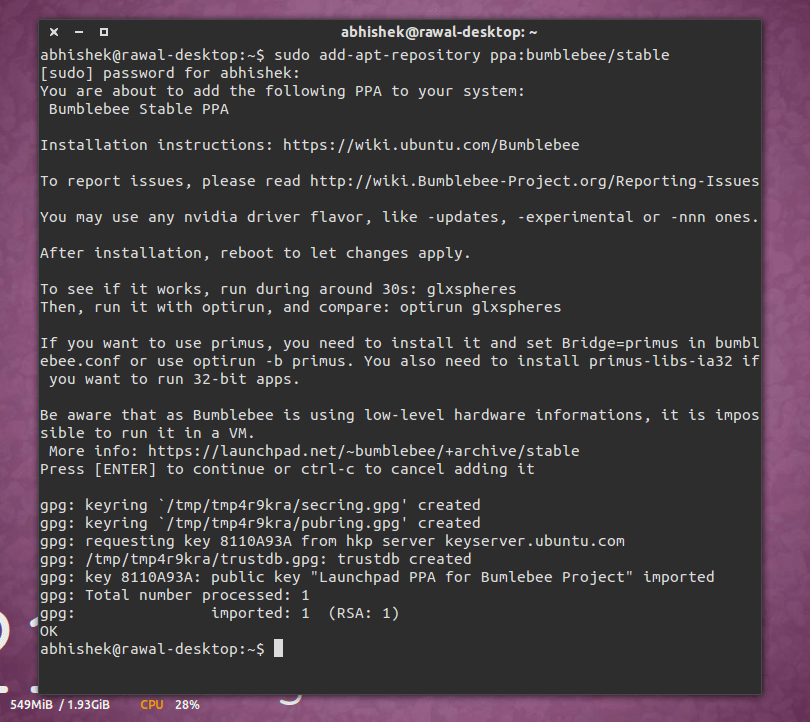
    I don't understand what's up. I can add the ppa easily.
    Check :

    Screenshot from 2013-08-11 16:21:47

    I guess you know how to add PPA, do you ? 👀
  • Sanyam Khurana

    Sanyam Khurana

    @sanyam-Nl7Zqc Aug 11, 2013

    Abhishek Rawal
    I guess you know how to add PPA, do you ? 👀
    Yeah, I have read your threads about PPA...

    but when you have given the command here, why is it not working for me...

    😕
  • Sanyam Khurana

    Sanyam Khurana

    @sanyam-Nl7Zqc Aug 11, 2013

    :argh: I think may be it is something to do with 32 bit OS, while my machine can support 64 bit...

    I think, I'll go for 13.04 now...

    😉

    BDW, how much swap area should I allocate? or if I just don't allocate anything.?
  • Abhishek Rawal

    Abhishek Rawal

    @abhishek-fg9tRh Aug 11, 2013

    Swap Area = 2x RAM size.
    But I have noticed that SWAP Area will never be used by Linux. Swap Area works like virtual Ram when system consumes all the physical memory it will use swap area so the system doesn't hang.
  • Sanyam Khurana

    Sanyam Khurana

    @sanyam-Nl7Zqc Aug 11, 2013

    Abhishek Rawal
    Swap Area = 2x RAM size.
    But I have noticed that SWAP Area will never be used by Linux. Swap Area works like virtual Ram when system consumes all the physical memory it will use swap area so the system doesn't hang.
    Yup I read that, so I'm gonna allocate around 8 GB 😉
  • Abhishek Rawal

    Abhishek Rawal

    @abhishek-fg9tRh Aug 11, 2013

    Sanyam Khurana
    Yup I read that, so I'm gonna allocate around 8 GB 😉
    You'll never need that many of. Swap Area used to be very useful during old times when 256 MB RAM were treated like 16 GB RAM.
    Now a days, it's wastage of memory. 16 GB is just insane amount for SWAP Area.
  • Sanyam Khurana

    Sanyam Khurana

    @sanyam-Nl7Zqc Aug 11, 2013

    Hey One more thing, When I installed Ubuntu this time, I faced some problem, when I created three partitions, it asked me to tell the type of those, I don't remember exactly what options it gave me, but could you tell me more about that?
  • Sanyam Khurana

    Sanyam Khurana

    @sanyam-Nl7Zqc Aug 11, 2013

    Abhishek Rawal
    You'll never need that many of. Swap Area used to be very useful during old times when 256 MB RAM were treated like 16 GB RAM.
    Now a days, it's wastage of memory. 16 GB is just insane amount for SWAP Area.
    I have 4 GB of RAM, and I think it's enough, but still if I want to allocate some SWAP memory, how much should I allocate ?
  • Abhishek Rawal

    Abhishek Rawal

    @abhishek-fg9tRh Aug 11, 2013

    4 partitions, not 3.

    / - 40 GB is like 'whoa! enough!'
    /boot - 450 MB
    /home - As per your use
    SWAP Area - 2x RAM

    Sanyam Khurana
    I have 4 GB of RAM, and I think it's enough, but still if I want to allocate some SWAP memory, how much should I allocate ?
    Go for 6, not a single byte more.
  • Sanyam Khurana

    Sanyam Khurana

    @sanyam-Nl7Zqc Aug 11, 2013

    Abhishek Rawal
    4 partitions, not 3.

    / - 40 GB is like 'whoa! enough!'
    /boot - 450 MB
    /home - As per your use
    SWAP Area - 2x RAM


    Go for 6, not a single byte more.
    I have 750 GB HDD

    So, for root directory, 40 GB, /boot 450 MB, and I want to have one more for all the stuff, like around 250 GB- 300 GB.

    For what is /home used for..?
  • Abhishek Rawal

    Abhishek Rawal

    @abhishek-fg9tRh Aug 11, 2013

    /home is where the hidden files related to DE, some of your software configs,Wine,etc. is stored. It should be maximum, as most of the work is primarily stored in /home only.
    If I am doing coding, I usually store all the files in /home only, makes it very easy & fast to access.
  • Sanyam Khurana

    Sanyam Khurana

    @sanyam-Nl7Zqc Aug 12, 2013

    Does Wine supports only some limited software programs?
  • Abhishek Rawal

    Abhishek Rawal

    @abhishek-fg9tRh Aug 12, 2013

    Sanyam Khurana
    Does Wine supports only some limited software programs?
    <a href="https://appdb.winehq.org/" target="_blank" rel="nofollow noopener noreferrer">WineHQ - Wine Application Database</a>
  • Sanyam Khurana

    Sanyam Khurana

    @sanyam-Nl7Zqc Oct 17, 2013

    @#-Link-Snipped-# need your help, I just installed Ubuntu 13.04

    Made three partitions,
    one having the linux file system, and the other two for other stuff, but it seems something went wrong, I cannot do anything with the other two partitions, neither store some stuff, nothing..

    This is what I got from properties of one of the partition, it says that the root user has access, but I'm the root user, then what's the problem?

    [​IMG]
  • Abhishek Rawal

    Abhishek Rawal

    @abhishek-fg9tRh Oct 17, 2013

    Install gparted
     sudo apt-get install gparted 
    Open it & format those two drives to NTFS. (This should fix it)

    BTW Ubuntu 13.10 Saucy Salamander stable build is released.
  • Sanyam Khurana

    Sanyam Khurana

    @sanyam-Nl7Zqc Oct 17, 2013

    Abhishek Rawal
    Install gparted
     sudo apt-get install gparted 
    Open it & format those two drives to NTFS. (This should fix it)

    BTW Ubuntu 13.10 Saucy Salamander stable build is released.
    It worked, Thanks.
  • Abhishek Rawal

    Abhishek Rawal

    @abhishek-fg9tRh Oct 18, 2013

    Sanyam Khurana
    It worked, Thanks.
    I am glad, I was able to help you 😀
  • Sanyam Khurana

    Sanyam Khurana

    @sanyam-Nl7Zqc Oct 18, 2013

    Abhishek Rawal
    I am glad, I was able to help you 😀
    If I update directly to 13.10, will my previous data be there or all formated?
  • Abhishek Rawal

    Abhishek Rawal

    @abhishek-fg9tRh Oct 18, 2013

    Sanyam Khurana
    If I update directly to 13.10, will my previous data be there or all formated?
    Data ? You mean apps ? Don't worry they will be updated too.
    You know I always ask people to have seperate /home, so when you upgrade you won't lose your data.
    However if you've added PPAs, you need to purge 'em first before doing upgrade.
  • Sanyam Khurana

    Sanyam Khurana

    @sanyam-Nl7Zqc Oct 21, 2013

    @#-Link-Snipped-#

    I need to install Turbo C compiler, i saw a post saying to place the zip file in a folder and writing command through DOS box, but that command is not working,

    If you know any other method please tell...

    +

    Code Blocks program isn't compiling, I have tried making with a new project and new file, but what it gives me, is the output of the first test program "Hello World"

    I'm feeling like crying..

    PS : This is the #-Link-Snipped-#
  • Abhishek Rawal

    Abhishek Rawal

    @abhishek-fg9tRh Oct 21, 2013

    LOL What's TurboC ? Turbo C & DOS in Unix, You gotta be kiddin me.

    GNU GCC C Compiler is preinstalled in Ubuntu. For C++, do apt-get g++.
    Use 'geany' IDE it's lightweight.However, I am not fond of IDEs, as with addons/plugins/extensions gVim can do as goog as what IDEs can.
  • Sanyam Khurana

    Sanyam Khurana

    @sanyam-Nl7Zqc Oct 21, 2013

    But I don't want a gcc compiler, I specifically want turbo c
  • Abhishek Rawal

    Abhishek Rawal

    @abhishek-fg9tRh Oct 21, 2013

    Sanyam Khurana
    But I don't want a gcc compiler, I specifically want turbo c
    Then IDK buddy, I've been using GCC for quite long. It is constant in development & quite good.
    I don't understand why you wanna use TurboC when world's best compiler is already been shipped with distro.
  • Anand Tamariya

    Anand Tamariya

    @anand-tamariya-DnfjEX Oct 21, 2013

    Sanyam Khurana
    But I don't want a gcc compiler, I specifically want turbo c
    I'm curious too - why do you want TurboC specifically?