Run GRE POWERPREP In Windows Vista, Windows 7

Kaustubh Katdare

Kaustubh Katdare

@thebigk Oct 26, 2024
It seems that GRE Powerprep software does not automatically run in Windows Vista and Windows 7 operating system. If you are facing the problem, you can try this simple trick that does the magic -

1. Install powerprep.
2. Find the program in your start/run menu
3. Right-click on the power-prep icon.
4. Choose 'Run As Administrator'
5. Powerprep runs 👍

If you are facing problems, please share them in response to this post. We'll be happy to help.

Replies

Welcome, guest

Join CrazyEngineers to reply, ask questions, and participate in conversations.

CrazyEngineers powered by Jatra Community Platform

  • ISHAN TOPRE

    ISHAN TOPRE

    @ishan-nohePN Jun 23, 2011

    What is a powerprep software? Is it a software to help study GRE?
  • dsx

    dsx

    @dsx-kstFGf Mar 7, 2013

    I still can't run the Program (GRE PowerPrep II). I have Windows 7 and IE9.

    1. I Open it with Run as Administrator
    2. I click on 'Allow Blocked Content'
    3. I click 'Yes' on the ActiveX warning Box
    4. I click On Continue... and nothing loads.
  • Kaustubh Katdare

    Kaustubh Katdare

    @thebigk Mar 7, 2013

    #-Link-Snipped-# : There's a chance that the installation media is corrupt. Did you download the software from official website? Or did you test the installation on other machine (maybe your friends' ?).
  • davala

    davala

    @davala-KZVm9I Aug 27, 2013

    I have windows 7 and IE 8 and i have downloaded from ETS..... powerprep 2 is not working. ...I followed all the above steps mentioned but unable to load when clicked on continue
  • Sashankg10

    Sashankg10

    @sashankg10-3QQWRT Nov 15, 2013

    You must use Internet Explorer 6 or higher to launch the POWERPREP II software.
    Please re-open POWERPREP II from the Start menu entry or call for assistance.
    NOTE: In addition, you must allow ActiveX on this page in order to continue.


    These are the commands that are prompting while following the above protocols... What to do ???
  • Sashankg10

    Sashankg10

    @sashankg10-3QQWRT Nov 15, 2013

    and i am IE9
  • zqhbbb

    zqhbbb

    @zqhbbb-IQO7xV Feb 23, 2014

    I got the same issue, is there anybody can solve it now?
    And I am IE10
  • Ankita Katdare

    Ankita Katdare

    @abrakadabra Feb 23, 2014

    Unfortunately, you can't use it with Windows 7 Home Addition so you'll have to find a way to upgrade.
    You can download a program by Microsoft called Windows Virtual PC which allows you to run Windows XP from Windows 7.
  • Gracia

    Gracia

    @gracia-XLfs3f Sep 19, 2014

    Hello,

    I had the same problem before, but now I have no trouble by following:

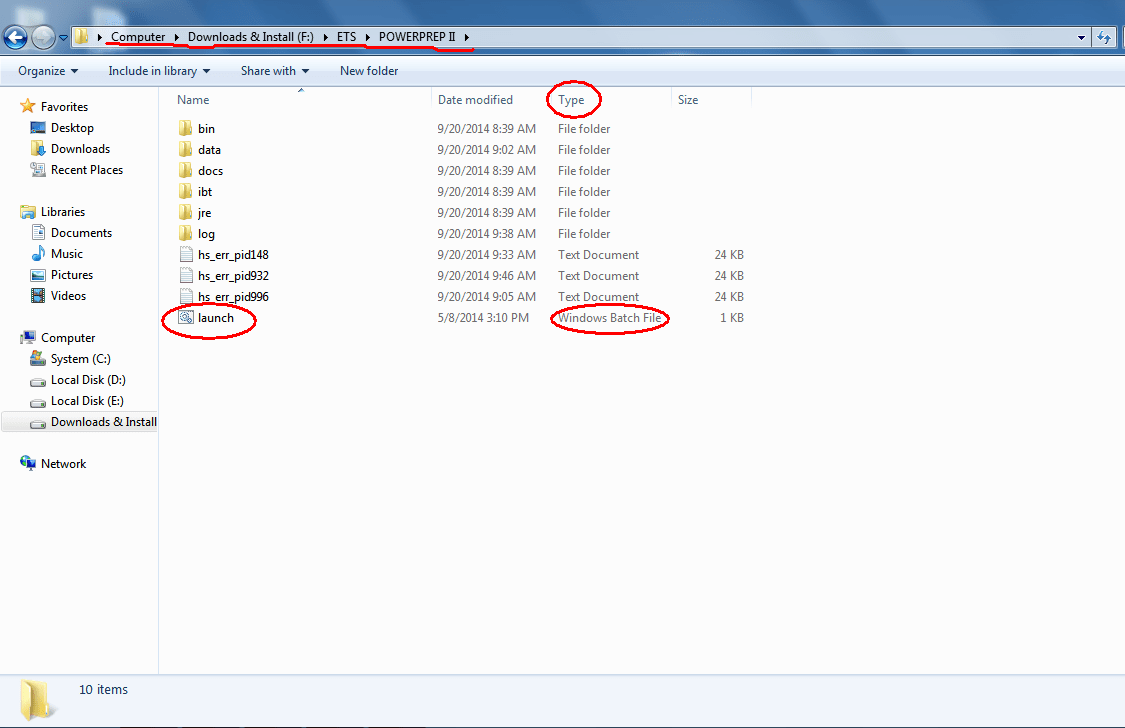
    1. Open the folder where you have installed the POWERPREP 2,
    e.g I have installed it :

    Folder

    2. Double click on" Launch(type: Windows Batch File)" , showed above

    3. Wait a moment and the" GRE Practice Test Launch Screen" will appear

    Good Luck, I hope it will help you.

    "Unless you have courage, a courage that keeps you going, always going, no matter what happens, there is no certainty of success."
  • Neophyte Nitol

    Neophyte Nitol

    @neophyte-nitol-JasH7I Jan 4, 2015

    Thank you so much Gracia.....it fucking helped me a lot....you got me a RELIEF 😒 😀

    **for replying only, I've signed me up 😉
  • sindhura28

    sindhura28

    @sindhura28-5LI2P3 Jun 16, 2015

    I've opened GRE powerprepII . it goes till the continue option and doesn't load further. i've allowed the blocked content and also allowed ActiveX. still is doesn't work. further I've also tried opening the launch.bat. it says the file isnt found to open.
    CAn somebody kindly help me regarding this issue. 😔[​IMG]
  • sindhura28

    sindhura28

    @sindhura28-5LI2P3 Jun 16, 2015

    I've opened GRE powerprepII . it goes till the continue option and doesn't load further. i've allowed the blocked content and also allowed ActiveX. still is doesn't work. further I've also tried opening the launch.bat. it says the file isnt found to open.
    CAn somebody kindly help me regarding this issue.
  • ArunPutcha

    ArunPutcha

    @arunputcha-acmIeX Jul 31, 2015

    Thanks A Lot Gracia..!! 😀
    Saved my day..!! 😁
  • Muna Akheel

    Muna Akheel

    @muna-akheel-6FjacO Aug 31, 2015

    Thank you so much Gracia!! You are an Angel ! 😀
  • Gauresh7492

    Gauresh7492

    @gauresh7492-6bAO2n Sep 12, 2015

    Guys, I also faced the same below problem.
    PROBLEM : I opened GRE powerprepII . it goes till the continue option and doesn't load further.

    Solution : You must have installed powerprepII in the non-windows(other than OS) drive.
    Install software and JAVA in the OS drive and then start it normally or as administrator.
    Remember only IE 6 and higher versions are supported.
    Also go to Tools in IE - Internet Options - Advanced - Settings - Security - check all allow active content check boxes.
    It will work 😀
  • shreeja.visweswaraiah

    shreeja.visweswaraiah

    @shreejavisweswaraiah-9mrAXZ Nov 3, 2015

    for those whom the above solution didnt work.

    Go to the installed folder ../ETS/POWERPREPII/
    go to bin folder bin/
    Double-click on the I.bat which is a windows batch file.
  • shea

    shea

    @shea-QRiUpe Jan 22, 2016

    THANK YOU!!!!!!!!!!!!!!!!!!!!!!!!!!!!!!!!!!!!!!!!!!!!!!!!!!!!!!