

How to embed Facebook videos in web pages / wordpress posts?

@abrakadabra
•
Oct 26, 2024
Oct 26, 2024
1.5K
So, you might have heard that Facebook recently introduced the facility of embedding Facebook videos in your web pages. This essentially means that Facebook content can now be shared outside of their platform much like how we share YouTube or Vimeo videos.
I however tried to use this functionality but am not getting the expected results.
I have a wordpress blog and I tried embedding the Facebook video by using the code provided by Facebook.
Here's what I did.
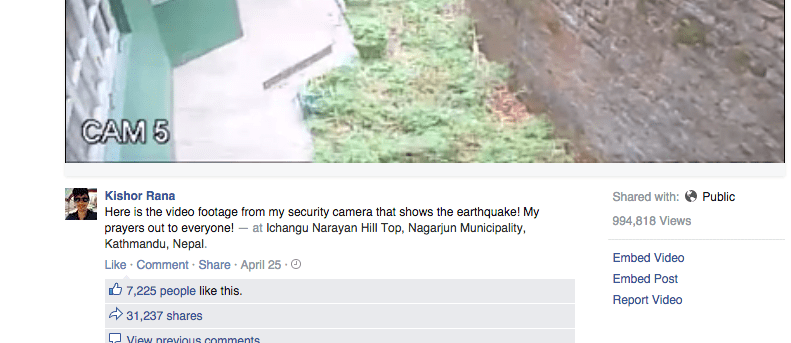
1. Go to Facebook video page. Below the video on the right hand side there's a link called 'Embed Video'. Click on it.
2. On clicking the link, an overlay appears where you can copy the embed code. Here's what it looks like:
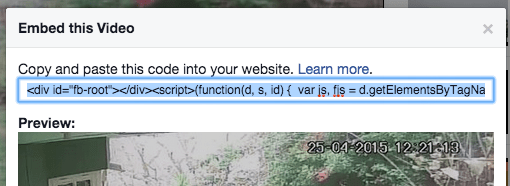
3. I copied the code and pasted it in my WordPress post.
But it just doesn't work! 👎😔
Then I tried a different method -
Every video on Facebook has a unique ID string that can be seen in the URL.
The ID lies next to the parameter v.
Example: (?v=XXXXXXXXXXXX).
So, I used the iframe tag:
However, still no results.
Is this facility still not working properly from Facebook's side? Has anyone tried it?
Please help.
I however tried to use this functionality but am not getting the expected results.
I have a wordpress blog and I tried embedding the Facebook video by using the code provided by Facebook.
Here's what I did.
1. Go to Facebook video page. Below the video on the right hand side there's a link called 'Embed Video'. Click on it.
2. On clicking the link, an overlay appears where you can copy the embed code. Here's what it looks like:
3. I copied the code and pasted it in my WordPress post.
But it just doesn't work! 👎😔
Then I tried a different method -
Every video on Facebook has a unique ID string that can be seen in the URL.
The ID lies next to the parameter v.
Example: (?v=XXXXXXXXXXXX).
So, I used the iframe tag:
<iframe src=”https://www.facebook.com/video/embed?video_id=XXXXXX”
width=”540″ height=”420″ frameborder=”0″></iframe>
Just replaced the XXXX with the facebook video ID.
However, still no results.
Is this facility still not working properly from Facebook's side? Has anyone tried it?
Please help.
