

Facebook Asks, "How Do You Pronounce Your Name?"

It is a well known fact that the social networking website Facebook wants to know your personal information with the minutest detail. Leaving up to its name, the internet giant has come up with a new feature that lets users share how they want their name to be pronounced. Since the feature hasn't been made available to users worldwide, it was highly probable that it is just an experiment the Facebook engineers are toying with. However, the Facebook team confirmed to Yahoo Tech saying that they are currently testing it only for a handful of English speakers in the U.S. Among the users who could see the Facebook's name pronounce feature on their profiles, it was a Twitter user RinRi who posted a screenshot of it. Take a look -
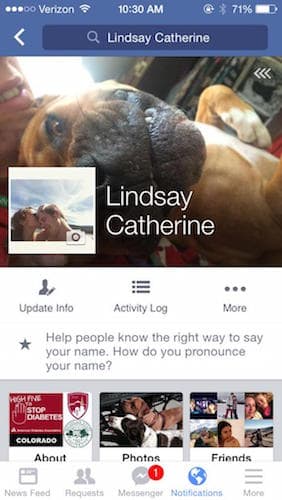
The pronunciation of the name will be displayed on the user's profile in text as well as audio format. So anyone on your friends list can click and check how to pronounce your name correctly. To set the feature, users need to go to the 'About' tab on their profile and then find an option that reads 'Details About You'. After clicking on it, Facebook will ask, "How do you say your name?". The social network displays a list of possible pronunciation options, as well as button to play a sample audio clip. If from the pre-defined choices, none matches yours, you can type in a new pronunciation key.
The move might be a part of Facebook's aim to deliver a more personalised experience to its users. Many a times, we know some people via Facebook and have known them for years without meeting them ever. In Asian countries, it gets very difficult to pronounce a person's name correctly, owing to vast differences in our languages. It seems that the feature might actually be useful for Facebook users in India.
What are your thoughts about the Facebook pronounce feature? Share with us in comments below.
Source: #-Link-Snipped-# | #-Link-Snipped-#
