Compiling through command prompt problem

Vishal Sharma
@vishal-pysGmK โ€ข Oct 25, 2024

Hi, I am using gcc compiler to compile the program and build an exe
I used this command to compile
gcc program.cpp -g -o program (generates program.exe and runs fine)
But, if i write the same thing in system("gcc program.cpp -g -o program"); programmatically, then the exe is generated but, while running it I get a prompt saying "the exe is not compatible...... make see whether you need 32 bit or 62 bit"
I'm using dev c++ for the program! any solutions??

Replies

Welcome, guest

Join CrazyEngineers to reply, ask questions, and participate in conversations.

CrazyEngineers powered by Jatra Community Platform

  • Abhishek Rawal

    @abhishek-fg9tRh Aug 9, 2013

    You have to use g++ not gcc for C++ programs.

    g++ prog.cpp -o prog

    You can use gcc too, but you have to mention C++ std libs i.e -lstdc++
    I prefer using g++ instead.

  • Vishal Sharma

    @vishal-pysGmK Aug 9, 2013

    Abhishek RawalYou have to use g++ not gcc for C++ programs.

    g++ prog.cpp -o prog

    You can use gcc too, but you have to mention C++ std libs i.e -lstdc++
    I prefer using g++ instead.


    As far as i know, g++ is only for compiling not to generate an exe... ๐Ÿ˜’ anyway, I'll try and get back here!

    actually, gcc is also working fine if I do it in cmd. but when I'm using system() in my program, i get that prompt!

  • Vishal Sharma

    @vishal-pysGmK Aug 9, 2013

    Abhishek RawalYou have to use g++ not gcc for C++ programs.

    g++ prog.cpp -o prog

    You can use gcc too, but you have to mention C++ std libs i.e -lstdc++
    I prefer using g++ instead.

    Okay, I tried g++ too. same thing happens!

  • Abhishek Rawal

    @abhishek-fg9tRh Aug 9, 2013

    Cd to directory where executable file is stored then ./exefile

    Doesn't this ^ executes the program ?
    Well from what I tested in Linux, gcc doesn't compile C++ program but g++ do.
    And it executes the program easily.

  • Abhishek Rawal

    @abhishek-fg9tRh Aug 9, 2013

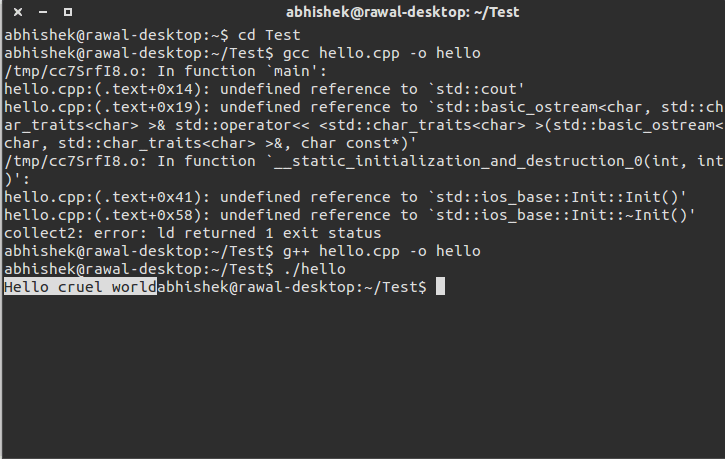
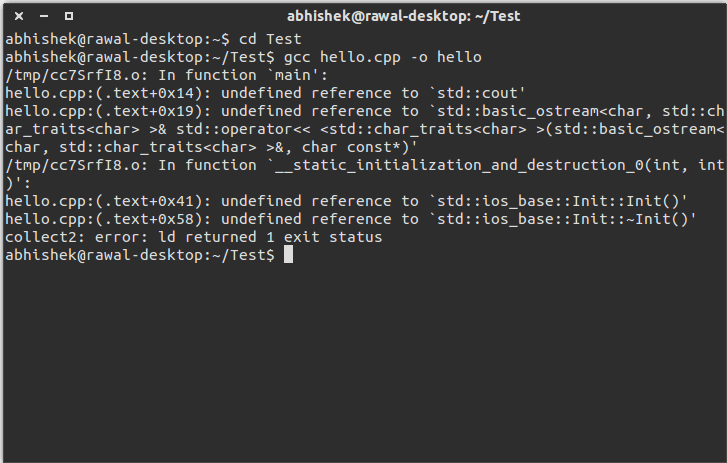
    Test with gcc (error in compiling) :
    1

    Test with g++ (successful compiling & executing) :
    2

    How you compiled without using -lstdc++ with 'gcc' ? ๐Ÿ˜จ

  • Vishal Sharma

    @vishal-pysGmK Aug 9, 2013

    Abhishek RawalCd to directory where executable file is stored then ./exefile

    Doesn't this ^ executes the program ?
    Well from what I tested in Linux, gcc doesn't compile C++ program but g++ do.
    And it executes the program easily.


    through command prompt, if i go to the location where my .cpp file is, and use any of gcc or g++ commands, i get the .exe file and it runs.
    but coming to the programming, when I use the

    system("g++ program.cpp -o program");

    then program.exe is created but when i run it either by program or manually by double clicking or through command prompt, i get this message!

    "The version of this file is not compatible with the version of windows you are running. Check your computer's system information to see whether you need an x86 or x64 version of the program, and then contact software publisher"
    I think I explained everything now!

  • Abhishek Rawal

    @abhishek-fg9tRh Aug 9, 2013

    Vishal0203when i run it either by program or manually by double clicking or through command prompt, i get this message!

    "The version of this file is not compatible with the version of windows you are running. Check your computer's system information to see whether you need an x86 or x64 version of the program, and then contact software publisher"
    I think I explained everything now!

    In Linux we can't open .exe file extension by double-clicking it, hence I have never tried executing like that for any C/C++ programs.

    Maybe Windows user can help you then.
    Sorry,mate.

  • Vishal Sharma

    @vishal-pysGmK Aug 9, 2013

    Abhishek RawalTest with gcc (error in compiling) :
    1

    Test with g++ (successful compiling & executing) :
    2

    How you compiled without using -lstdc++ with 'gcc' ? ๐Ÿ˜จ


    This is what I'm getting all the time!! used both gcc and g++

  • Abhishek Rawal

    @abhishek-fg9tRh Aug 9, 2013

    g++ -o program.exe program.cpp

    The type : program

    This should work!

  • Vishal Sharma

    @vishal-pysGmK Aug 9, 2013

    Abhishek RawalJust type program in CMD shell.

    same... It's pissing me off now! ๐Ÿ˜•

  • Abhishek Rawal

    @abhishek-fg9tRh Aug 9, 2013

    Vishal0203same... It's pissing me off now! ๐Ÿ˜•

    Edited, try this :

    Abhishek Rawalg++ -o program.exe program.cpp

    Then type : program

    This should work!
  • Vishal Sharma

    @vishal-pysGmK Aug 9, 2013

    Abhishek RawalEdited, try this :


    Its similar to what i typed before
    there is no difference in
    g++ program.cpp -o program
    g++ program.cpp -o program.exe
    and
    g++ -o program.exe program.cpp

    -o
    is just for giving the name to exe file generated if we don't write -o then a.exe will be created since it is default..
    all the three commands show the same message

  • Abhishek Rawal

    @abhishek-fg9tRh Aug 9, 2013

    Well I know that, right ?
    I am just using Trial & error method, if by any miracle it helps you out (which shouldn't logically) & solves your problem.

    However,
    It shouldn't compile when you use 'gcc' without using -lstdc++ but it is happening in your case because it simply can't link without using that (-lstc++), unless you use g++.

    I don't know, but I think there might be problem in installing gcc properly. Or some libraries are missing ?

  • Vishal Sharma

    @vishal-pysGmK Aug 9, 2013

    I'm using the things which came along with the dev-c++ ... the bin folder already consist of all the dll's necessary! and compiling the program through dev has no problems.... it arises only in cmd

  • Abhishek Rawal

    @abhishek-fg9tRh Aug 9, 2013

    Vishal0203it arises only in cmd

    So, only last thing comes in my mind is :
    Run CMD.exe as administrators.

  • Vishal Sharma

    @vishal-pysGmK Aug 9, 2013

    Abhishek RawalSo, only last thing comes in my mind is :
    Run CMD.exe as administrators.

    or may be its a problem with OS

  • Abhishek Rawal

    @abhishek-fg9tRh Aug 9, 2013

    Vishal0203or may be its a problem with OS

    Could be. Have you tried this in any other PC ?
    Or simply switch to Linux ๐Ÿ˜

  • Vishal Sharma

    @vishal-pysGmK Aug 9, 2013

    Abhishek RawalCould be. Have you tried this in any other PC ?
    Or simply switch to Linux ๐Ÿ˜

    haha.. that would be the last option! anyway, thanks for your patience!

  • rahul69

    @rahul69-97fAOs Aug 9, 2013

    Vishal0203haha.. that would be the last option! anyway, thanks for your patience!

    Actually I think it is the compatibility problem, my guess is that u are using Windows 7 (maybe 64 bit) so the exe being created is not compatible, so if u need to run this, you can run this exe in windows XP (see if some friend of yours have XP installed, then take this exe, and run on his computer), or using virtualbox (with XP).
    Hope it helps

  • Vishal Sharma

    @vishal-pysGmK Aug 10, 2013

    rahul69Actually I think it is the compatibility problem, my guess is that u are using Windows 7 (maybe 64 bit) so the exe being created is not compatible, so if u need to run this, you can run this exe in windows XP (see if some friend of yours have XP installed, then take this exe, and run on his computer), or using virtualbox (with XP).
    Hope it helps

    come on! I'm not that dumb ๐Ÿ˜›
    I know I'm using 32 bit OS.. so it must work fine!

  • rahul69

    @rahul69-97fAOs Aug 10, 2013

    Vishal0203come on! I'm not that dumb ๐Ÿ˜›
    I know I'm using 32 bit OS.. so it must work fine!

    Yes u r not! but once I faced a similar problem, and it happens when the program being used have some 16 bit dependencies, I once faced similar issue, I was using Win 7 32 bit at that time, seemingly it didn't supported the program, but that program ran in XP ๐Ÿ˜ฒ