
Adobe Launches Comp CC iPad App For Designers

@dhananjay-0OEUGZ
•
Oct 26, 2024
Oct 26, 2024
1.4K
American software giant Adobe recently unveiled its new product. Meet Comp CC, Adobe’s new app on iPad that lets designers create the content on the go. With Comp CC designers can start their work on iPad using resources on Adobe Cloud and then can continue it with InDesign, Illustrator and Photoshop. Designers can continue the early stages of their work with Comp CC, which also lets them develop designs beyond basic frames. Adobe started working on the product in 2013, later in 2014 the app was called Project LayUp and is developed by Khoi Vinh.
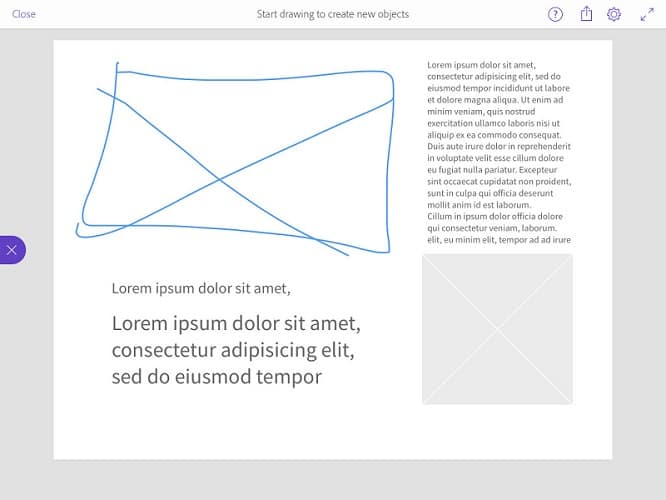
Reportedly, the app want to augment designers’ work. Unlike Adobe’s other three apps, this one is mobile making the person start working immediately. If a designer draws a square, the app would identify if it’s a picture or a text box based on settings. Designer draws another larger rectangle, the app identifies it as a headline box. The layout design is ready in few seconds. Speed is the most important factor for which the app has been designed. According to Vinh, designer could do anything just the way he/she wants it. There’s no need to tap on the menu option to choose the desired shape. The design so created with the app can easily be extended to other Adobe apps and finished on desktop.
Comp CC was first demoed in 2014 to display app’s responsiveness that makes perfect and neat shapes. The app includes gesture vocabulary and Typekit libraries. With this, user can filter by several parameters including personal favourites. It obviously won’t be fair to restrict design editing just to few apps. Hence the design can be exported to other apps to get better layout. Edit mode gives access to existing assets from Adobe Creative Cloud Libraries that gives user an idea about how the final work would look like.
Via #-Link-Snipped-#
Reportedly, the app want to augment designers’ work. Unlike Adobe’s other three apps, this one is mobile making the person start working immediately. If a designer draws a square, the app would identify if it’s a picture or a text box based on settings. Designer draws another larger rectangle, the app identifies it as a headline box. The layout design is ready in few seconds. Speed is the most important factor for which the app has been designed. According to Vinh, designer could do anything just the way he/she wants it. There’s no need to tap on the menu option to choose the desired shape. The design so created with the app can easily be extended to other Adobe apps and finished on desktop.
Comp CC was first demoed in 2014 to display app’s responsiveness that makes perfect and neat shapes. The app includes gesture vocabulary and Typekit libraries. With this, user can filter by several parameters including personal favourites. It obviously won’t be fair to restrict design editing just to few apps. Hence the design can be exported to other apps to get better layout. Edit mode gives access to existing assets from Adobe Creative Cloud Libraries that gives user an idea about how the final work would look like.
Via #-Link-Snipped-#