Replies
Welcome, guest
Join CrazyEngineers to reply, ask questions, and participate in conversations.
CrazyEngineers powered by Jatra Community Platform
-
@thebigk • Aug 4, 2014
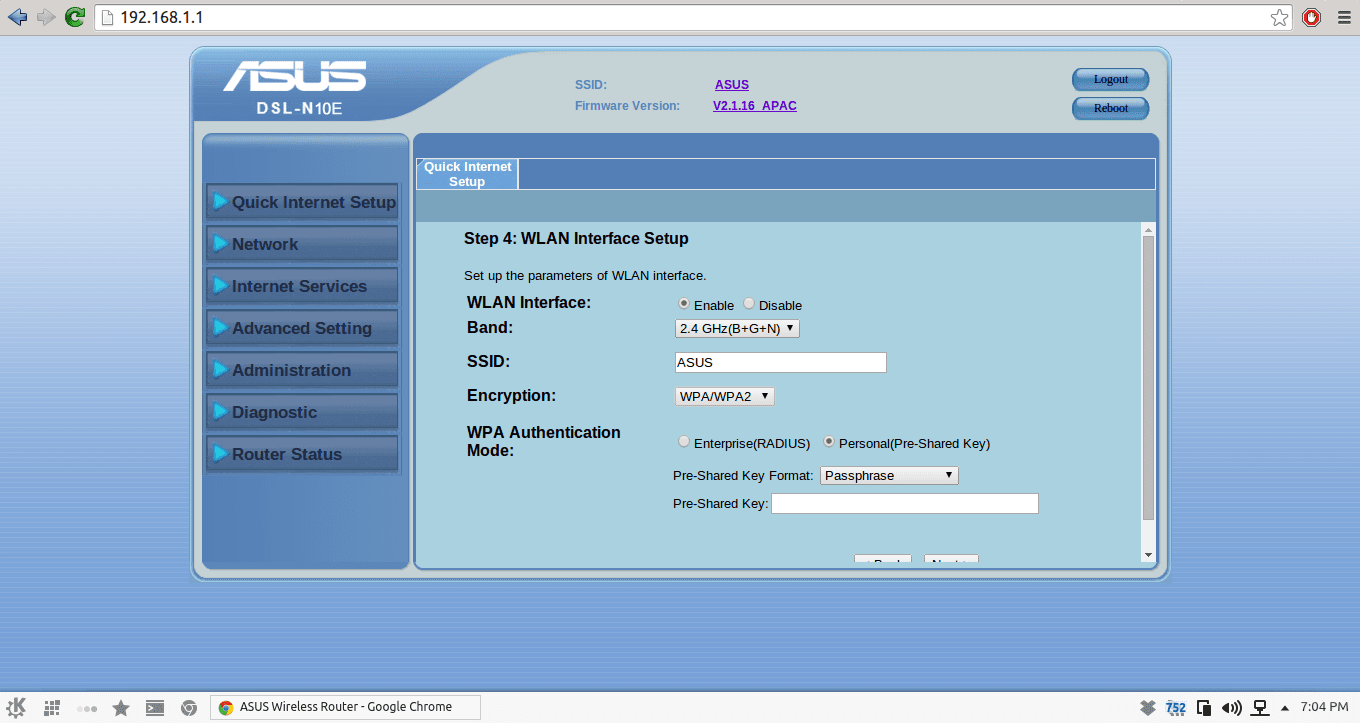
No security means anyone within the wireless range of your router will be able to connect - and consume the data and bandwidth meant for you. For the screen that you've pasted, I'd recommend -
1. 2.4 GHz (Better Range)
2. SSID -> Abhishek's Wi-Fi or any other name that you want your wireless connection to show.
3. Encryption: WPA2 should do.
4. WPA-PSK (Pre Shared Key) - Enter a keyword that the network will ask you when you connect. Don't keep it too complex; but keep it something that you can easily remember. Typing complicated passwords on phone is difficult. But it's a one time job! -
@abhishek-fg9tRh • Aug 4, 2014
Thanks a lot. Doing it & giving feedback asap. -
@abhishek-fg9tRh • Aug 4, 2014
#-Link-Snipped-# There are two WPA : 1) WPA2 (AES) 2) WPA2 (TKIP)
or WPA/WPA2 ?
Which one to select ? -
@thebigk • Aug 4, 2014
WPA 2 (AES) .Abhishek Rawal#-Link-Snipped-# There are two WPA : 1) WPA2 (AES) 2) WPA2 (TKIP)
or WPA/WPA2 ?
Which one to select ? -
@abhishek-fg9tRh • Aug 4, 2014
alrighty done. Thanks. -
@gollapinni-karthik-sharma-EgBEXm • Aug 4, 2014
WPA2( AES ) for higher security and encrypting your data and password -
@anoop-kumar-GDGRCn • Aug 4, 2014
Disable SSID broadcasting.
Whatever device you want to connect you need to enter SSID/password manually.