

Download Breach Browser - Because It's node.js + CSS + HTML 5 + GEEK

If you are a true geek who's unhappy with the current choice of browsers that dominate the market viz. Chrome, Firefox, IE, Opera etc., and want a browser that's a true extension of your own self; it's time to say hello to the 'Breach Browser'. It's no ordinary browser and not at all meant for the ordinary people - because it just doesn't run right-away after you download and install it on your machine. The browser can't function without asking you to install a few modules. Here's how the screen looks like after you've installed the browser -
Adding module...    [OK]
Downloading `mod_strip`...    [OK]
Installing dependencies...    [OK]
Running...    [OK]
Adding `github:breach/mod_strip`. This may take a few seconds. (Breach is downloading the module from GitHub and installing all its required nodeJS dependencies) FYI: Breach modules can be addressed by:
- a github repository: `github:breach/mod_strip`
- a local directory path: `local:~/src/spolu/mod_test`
Quite awesome, right? The Breach Browser is a brainchild of San Francisco based HTML/JS programmer Stanislas Polu. Polu developed the browser using Javascript and HTML 5 for the user interface and using Chromium Content API as the base layer. Polu wants you to customise your own browser experience by writing a few lines of JS / CSS code. Everything in the Breach browser is a module; and a web application runs in its own separate process. Breach embeds a Node.js event loop to control the overall Javascript implementation and the node.js process shakes hands with the core through IPC. Here's how your favorite CrazyEngineers looks like in the Breach browser -
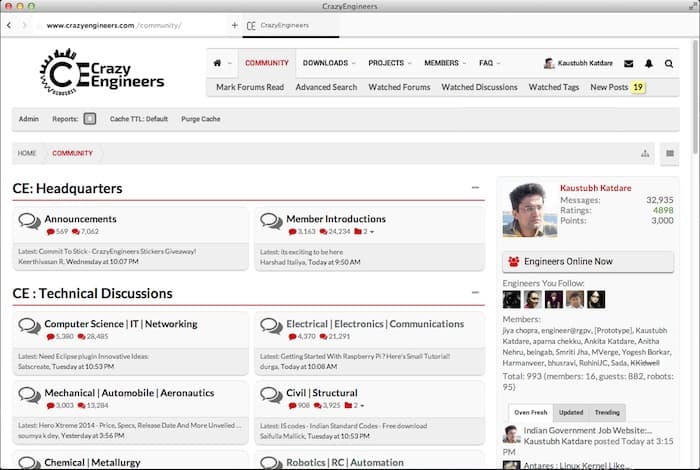
As of writing this article, the browser has been released in public Alpha. In our limited testing, we couldn't find anything out of place, but be assured that it's a total no-flesh experience for the time being; something you might actually enjoy. Hit the source link below and install the browser. Do not forget to share your thoughts with our fellow geeks!
Source: #-Link-Snipped-#
