
Increase speed of downloads in steam
Are you tired of slow download speed in steam .... There are loads of free games in steam that you wanna play ...
but waiting for downloads ... you hate it right ?
You have above 2mbps of speed still steam's data is been downloaded at 300 kBps ?
here's tip for steam gamers to boost download speed ..... its no hack .. just common tweak for people with common-sense.
go to page Steam: Game and Player Statistics
The smaller the bar the lesser people on it, the greater the speed.
![[IMG]](proxy.php?image=http%3A%2F%2Fi47.tinypic.com%2F2igyqae.png&hash=abe8b3303783b7cc719557397b434dc0)
Now as no Indian steam servers are available, select the most near server to india ... Malaysia !!
So, as you have identified your desired network.. open steam client
navigate second option "View" & select "Settings"
Now select "Downloads+cloud" tab .. select Malaysia as download region.
It will prompt you to restart the client to take changes in it...
Restart client & you will notice drastic change .
but waiting for downloads ... you hate it right ?
You have above 2mbps of speed still steam's data is been downloaded at 300 kBps ?
here's tip for steam gamers to boost download speed ..... its no hack .. just common tweak for people with common-sense.
go to page Steam: Game and Player Statistics
The smaller the bar the lesser people on it, the greater the speed.
Now as no Indian steam servers are available, select the most near server to india ... Malaysia !!
So, as you have identified your desired network.. open steam client
navigate second option "View" & select "Settings"
Now select "Downloads+cloud" tab .. select Malaysia as download region.
It will prompt you to restart the client to take changes in it...
Restart client & you will notice drastic change .
Replies
-
 silverscorpionI think the client selects the closest server to our location be default.
ie., what is the default server that the steam client uses? How is it selected? -
Anoop Kumarthe above trick you have said might work.
but above speed what you said is already more than 2Mbps.
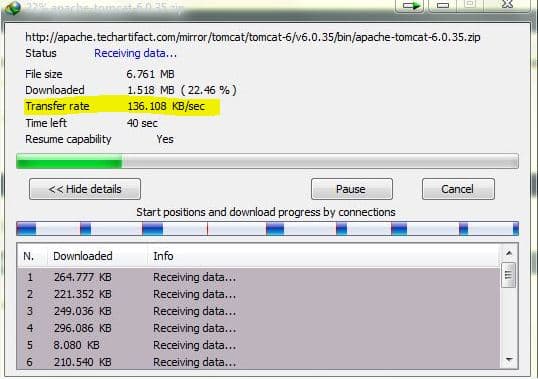
speed showing 300 is shown as 300MB/ps (B=byte) which means 300x8=2.4Mbps (b=bit).
Downloaders always shows downloaded data in Byte.
See following I have 1Mbps connection and getting around 120-130 kB/ps most of time.
which is average ~1Mbps speed.
-
Abhishek Rawal
Well, In my case when i saw it was "Denver" as default .... we were having discussion in Blizzard WOW forum & my guild-mate told me this tweak & i tried & observed very drastic difference in speed.silverscorpionI think the client selects the closest server to our location be default.
ie., what is the default server that the steam client uses? How is it selected?
Btw client can decide default mirrors but you can direct manually for specific region mirrors by this method. -
Abhishek Rawal
Lol dude i know this ... what ISP provides is downlink & uplink speed....ianoopthe above trick you have said might work.
but above speed what you said is already more than 2Mbps.
speed showing 300 is shown as 300MB/ps (B=byte) which means 300x8=2.4Mbps (b=bit).
Downloaders always shows downloaded data in Byte.
See following I have 1Mbps connection and getting around 120-130 kB/ps most of time.
which is average ~1Mbps speed.
Downlink/8 = download speed ...
I have 3.1mbps plan & i was just getting 175 kBps (3.1x1024 = 3174.4 /8 = 396.8 KBps) in steam so i posted this tweak for steam players having troubles like me. -
Anoop Kumar...175😨 on 3.1 Mbps ... you need to worry.
-
Abhishek Rawal
Yeah man .. but that sad speed only in steam .. in torrents its pretty good with 356-365 KBps 😀ianoop...175😨 on 3.1 Mbps ... you need to worry. -
Simarpreet Singh
hello #-Link-Snipped-# . i live in india, punjab, ludhiana . i had purchased gta 4 in steam yesterday . i started it to download at 10:18 pm . its 11:15 pm now and its only downloaded 43.9 mb out of 14 gb. pls tell me any download region which has fast download speed. or what you can say a server . pls suggest me one which is awesome and near ludhiana . it will be a great help if you tell me . pls answer me at my mail (simar20420@gmail.com) pls plsAbhishek RawalAre you tired of slow download speed in steam .... There are loads of free games in steam that you wanna play ...
but waiting for downloads ... you hate it right ?
You have above 2mbps of speed still steam's data is been downloaded at 300 kBps ?
here's tip for steam gamers to boost download speed ..... its no hack .. just common tweak for people with common-sense.
go to page Steam: Game and Player Statistics
The smaller the bar the lesser people on it, the greater the speed.
Now as no Indian steam servers are available, select the most near server to india ... Malaysia !!
So, as you have identified your desired network.. open steam client
navigate second option "View" & select "Settings"
Now select "Downloads+cloud" tab .. select Malaysia as download region.
It will prompt you to restart the client to take changes in it...
Restart client & you will notice drastic change .
You are reading an archived discussion.
Related Posts
If you are a small startup with < 5 members, you might consider using Teambox for team collaboration. What's the best part of Teambox? Well it offers integration with Dropbox,...
What happens to the Oresund Bridge during High and Low tides?
How is the sea water prevented from entering the tunnel?
Wireless charging is not new. More and more such chargers are getting into the market. However, medical device industry is chary of using something untested for human use to ensure...
Reduce live load to be used in earthquake and windload combination or full live load to be used in load combination in design of raft foundation.
i want to take backup of phone device connected to my pc using java programs